- comparison
- deskflex
- per-space pricing
- desk booking
- hybrid office
Desk & Park vs DeskFlex: two per-space models compared
Both price per space, not per user. Where DeskFlex is cheaper, where Desk & Park adds free tier, EU data, parking and SCIM, for a 100-space office.
Desk & Park and DeskFlex both charge per bookable space, not per user, so headcount growth costs nothing extra on either. The differences are elsewhere: DeskFlex publishes plans from 50 USD a month for up to 25 spaces and 75 USD for up to 50 (annual subscriptions, per deskflex.com in October 2026), which is cheaper than Desk & Park between 11 and 50 spaces; Desk & Park has a free plan for up to 10 spaces, a published price up to 125 spaces (2,300 USD a year), EU hosting with one database per customer, and SSO plus SCIM on every plan. At 100 spaces DeskFlex moves to an Enterprise quote.
Hybrid work in 2026 and who DeskFlex is
Most hybrid offices show a commonly observed weekly shape: Tuesday to Thursday are busy, Monday and Friday are quiet. That is why companies share desks, parking spots and meeting rooms through a booking app, and why the number of spaces is the stable quantity while headcount changes every quarter.
DeskFlex is a US workplace management platform (its website lists an office at 111 W. Jackson Blvd. in Chicago). Its site describes desk booking, meeting room scheduling, visitor management, 3D office floor plans, check-in and check-out, equipment and resource reservations, workplace analytics and mobile apps for iOS and Android. Its pricing page says pricing "is based on the number of workplace spaces you manage, not the number of employees using the platform."
Unlike our deskbird comparison, both vendors sell the same unit; what differs is what each includes at your size, where the data lives and how parking fits in.
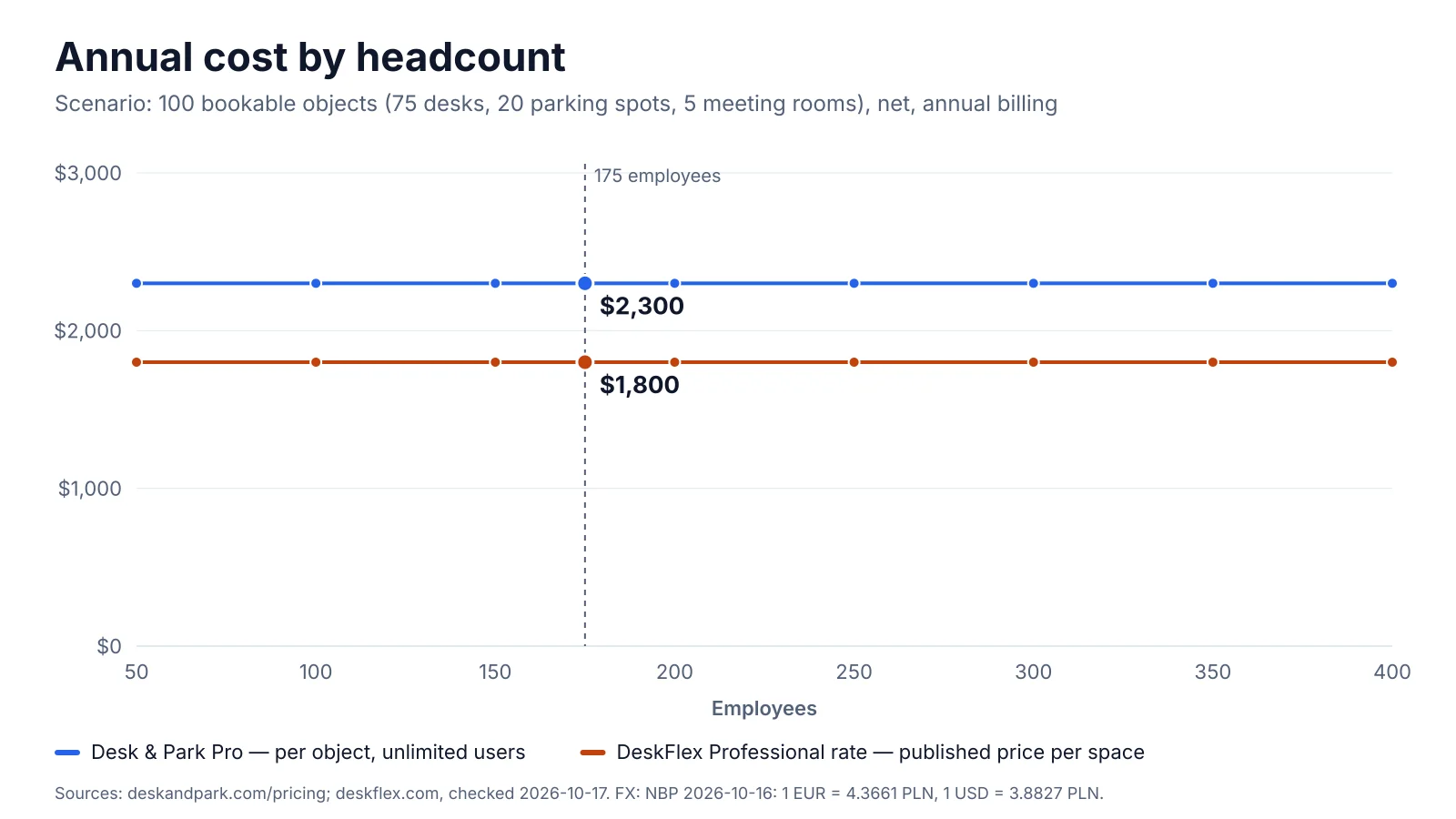
Both lines stay flat as headcount grows because both vendors price per space. DeskFlex line: illustrative extrapolation of its Professional rate to 100 spaces, which is not a published price.
Pricing and TCO: a 100-space office
The scenario we use in every comparison: 175 employees, 75 desks, 20 parking spots (4 of them with EV chargers) and 5 meeting rooms = 100 bookable objects.
Desk & Park. 100 objects fit the Pro plan (up to 125 objects, 10 locations): 2,300 USD net per year with annual billing (two months free), or 230 USD per month with monthly billing. Users are unlimited. There is no setup fee, no fee per floor plan and no implementation project.
DeskFlex. The published plans, per deskflex.com/pricing in October 2026, all sold as annual subscriptions:
| DeskFlex plan | Spaces | Published price | Per year |
|---|---|---|---|
| Growth | up to 25 | 50 USD per month | 600 USD |
| Professional | up to 50 | 75 USD per month | 900 USD |
| Enterprise | 100+ | Custom quote | Not published |
Growth includes one floor plan and Professional two. Enterprise adds multi-location deployments, enterprise onboarding, volume pricing and custom implementation. Every plan includes desk and room booking, visitor management, workplace analytics and single sign-on with Google Workspace, Microsoft Entra and Okta. Outlook calendar synchronisation and Microsoft Teams status come with a "Microsoft 365 Deep Integration add-on" whose price is not published.
Our 100-object scenario is above the published DeskFlex plans, so we apply its most favourable published rate:
- Professional: 75 USD ÷ 50 spaces = 1.50 USD per space per month.
- 100 spaces × 1.50 USD × 12 months = 1,800 USD per year (illustrative, not a DeskFlex quote).
- Published one-off fees for the scenario: none. Enterprise onboarding, custom implementation, extra floor plans and the Microsoft 365 add-on are listed without prices.
On that illustration DeskFlex is 500 USD a year cheaper (Desk & Park Pro costs 27.8 % more). The real Enterprise quote may be lower ("volume pricing") or higher (onboarding, implementation, add-on); ask for it in writing with the same 100 spaces.
By office size:
| Bookable spaces | DeskFlex (published, per year) | Desk & Park (annual billing) |
|---|---|---|
| 10 | 600 USD (Growth) | 0 USD (Start, free) |
| 25 | 600 USD (Growth) | 1,280 USD (Standard) |
| 50 | 900 USD (Professional) | 1,280 USD (Standard) |
| 75 | Not published | 1,280 USD (Standard) |
| 100 | Enterprise quote | 2,300 USD (Pro) |
Between 11 and 50 spaces DeskFlex's list price is lower. Up to 10 spaces Desk & Park is free, and from 51 to 125 spaces Desk & Park publishes a price while DeskFlex does not.
Growth from 175 to 250 people. Neither bill moves: both vendors count spaces, so 75 more people on the same 100 spaces leave Desk & Park at 2,300 USD and DeskFlex at its space-based quote.
All prices here are in USD as published. Desk & Park prices are net (excluding VAT); the DeskFlex pricing page does not say whether taxes are included.
Architecture and security
Desk & Park runs one PostgreSQL database per customer organisation. Your users, bookings, maps and audit log are not rows in a table shared with other customers; backups and erasure happen per organisation, and an incident in one database does not touch another (more in why workplace data needs an isolated database). Databases are hosted in Frankfurt and the application in the Netherlands, so the data stays in the EU. Backups are encrypted and taken nightly, and an audit log records who did what.
Sign-in: every user can use two-factor authentication (TOTP) and passkeys (WebAuthn), or a one-time e-mail code. Single sign-on uses OpenID Connect (Microsoft Entra ID, Google Workspace, Okta and other OIDC providers) and SCIM provisioning and deprovisioning (Entra ID, Okta), on every plan, including the free one.
The honest gaps: Desk & Park does not support SAML (OIDC only), and ISO 27001 and SOC 2 are planned, not certified. If your procurement checklist requires a SOC 2 report today, Desk & Park cannot provide one yet. For GDPR there is EU hosting, data export and deletion requests in the settings, and a data processing agreement.
DeskFlex, per its website in October 2026: SSO with Google Workspace, Microsoft Entra and Okta is included in every package. Its Okta and Microsoft 365 pages describe setup with a client ID and secret and say first-time users are provisioned automatically when they sign in. Its own blog describes DeskFlex as having an on-premise deployment option alongside the cloud service. The pages we checked do not publish a hosting region, a data isolation model, SCIM support or security certifications; if those matter, ask DeskFlex in writing.
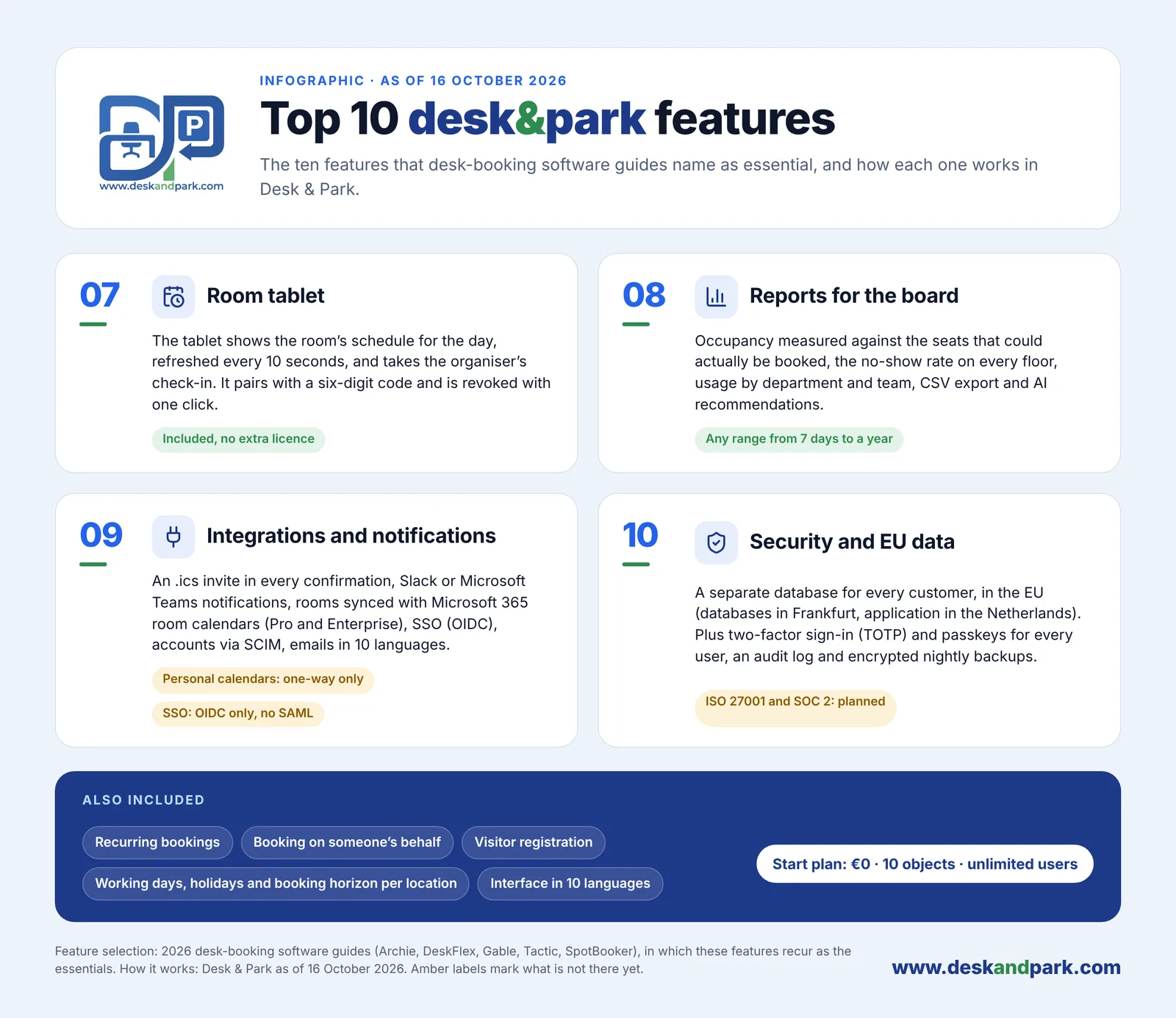
Features 07–10 of the Top 10: the room tablet, Board Reports, integrations, and security with EU data residency, plus what every plan also includes.
Employee experience and team coordination
Desk & Park works in any browser and installs as a PWA, with nothing from an app store. An Android app adds a native QR scanner, fingerprint or face unlock and push notifications; an iOS app is planned for 2027, and iPhone users book through the browser or PWA until then. That is feature 05 of the Top 10 Desk & Park features: book from your phone.
- One map for desks, parking and rooms. The admin uploads a plan image and places spaces; employees pick a spot colour-coded by availability for the chosen day. Parking has its own maps (garage and surface lot, for example), and EV charger spots are marked with ⚡. A desk and a parking spot booked together arrive as one calendar invitation. See parking booking and desk booking.
- Who's in the office. The map shows each booked person's photo or initials ringed in their team colour, with a green dot once they check in, and today's roster grouped by team. The company can switch it off and anyone can hide themselves; the server enforces both.
- Assigned spaces you can hand back. Board members (and managers on Enterprise) keep a permanent desk or parking spot. "I'm away today" releases it to colleagues for the day, "Take back" reverses it until someone claims it. There is no automatic release of permanent spaces after a missed scan.
- Guests without accounts, recurring bookings and booking on someone's behalf, in an interface available in 10 languages.
DeskFlex, per its site: native mobile apps for iOS and Android, 3D office floor plans with live availability and teammate locations, a view of who is in the office, recurring room reservations, booking rules and permissions by employee, department, location or role, visitor management with registration, notifications and badge printing, and reservations for equipment such as laptops and monitors. Its resource reservations page summary mentions parking and lockers alongside desks and rooms; the pages we checked do not describe parking maps or EV charger spots in detail. Its pages do not list the interface languages.
If a native iPhone app or 3D floor plans are a hard requirement today, DeskFlex has them and Desk & Park does not.
Space optimisation (CRE) and AI
The most expensive desk is the one booked and empty. Both products fight ghost bookings with check-in and automatic release.
Desk & Park puts a QR sticker on every desk, parking spot and room. Scanning a free desk books it and checks you in with one tap. A desk or parking booking that is not checked in by the organisation's deadline (for example "check in by 10:00") goes back to the pool automatically. Meeting rooms are released only if the organisation turns that on (off by default, after 5 to 120 minutes without a check-in); scanning the QR of a free room books the next half hour. More in ghost bookings and automatic release.
DeskFlex describes check-in by QR code, Bluetooth beacons and mobile devices, and automatic release of desks and meeting rooms when nobody checks in within a configurable window. Its product illustrations also show badge and Wi-Fi check-in, a point for DeskFlex if you want check-in without a scan.
Board Reports in Desk & Park measure occupancy against the seats that could actually be booked, the no-show (ghost) rate per floor and resource, usage by department and team, EV charging demand and the peak day, for any range from 7 days to a year, with CSV export.
AI recommendations: an admin clicks "Generate report"; a large language model receives aggregates only (no employee names) and returns 3–6 recommendations in categories such as cost saving, space consolidation, EV optimisation, ghost booking alerts, board member impact, ESG and capacity planning, each with an impact estimate written by the model. The board marks each one Dismiss or Mark as done (audited). It is not predictive machine learning or time-series forecasting, and Desk & Park does not calculate savings or costs; the impact estimate is the model's hypothesis to verify.
DeskFlex Workplace Analytics, per its site, tracks check-ins, no-shows, cancellations and occupancy, shows utilisation by floor, department and location, and e-mails scheduled reports.
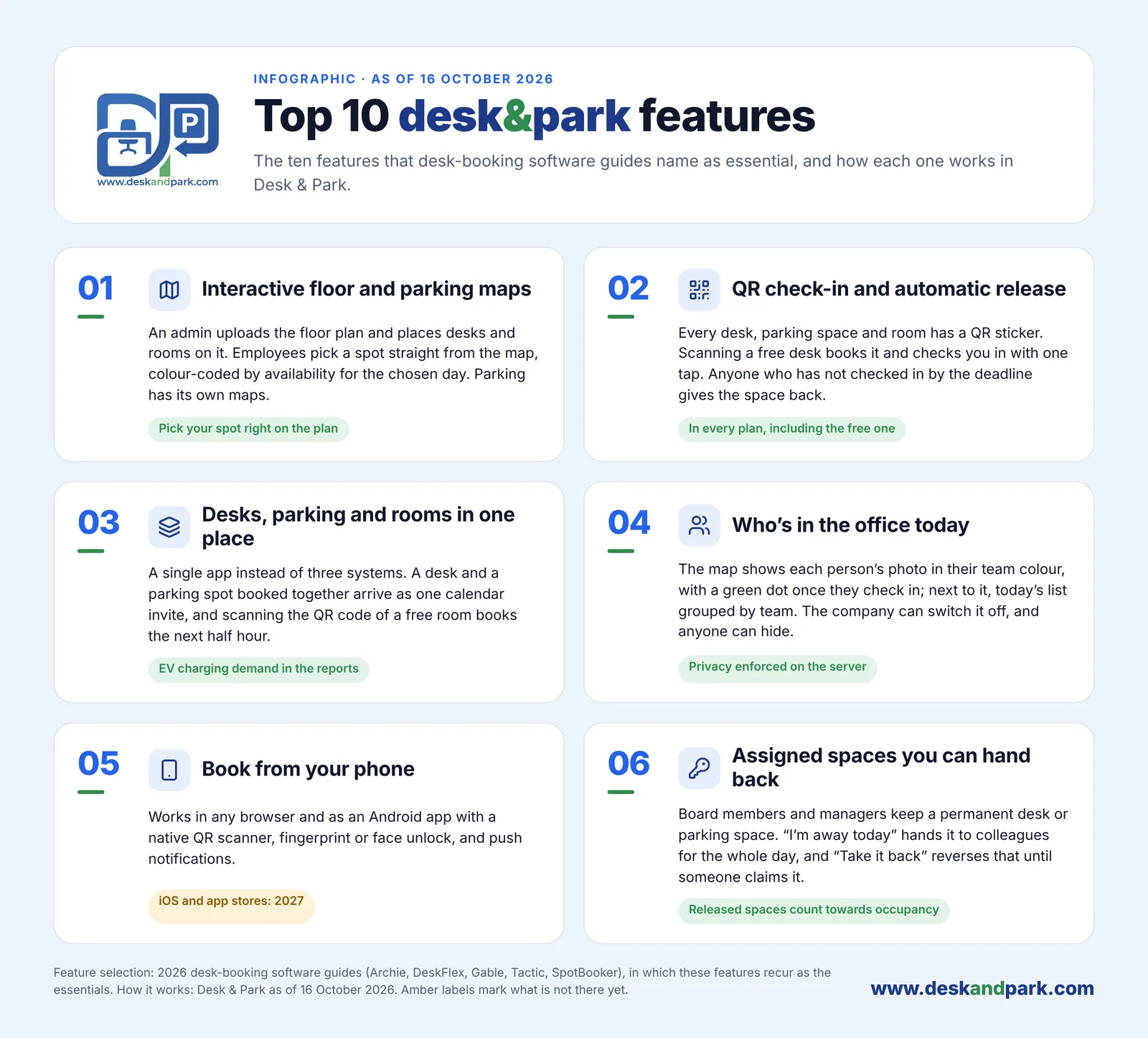
Features 01–06 of the Top 10: the everyday side of Desk & Park, from the booking map to assigned spaces you can hand back.
Side-by-side comparison
| Desk & Park | DeskFlex | |
|---|---|---|
| Pricing unit | Per bookable object (desk, parking spot, room); unlimited users | Per workplace space; "not the number of employees" |
| Entry price | Start: 0 USD, up to 10 objects, 1 location | Growth: 50 USD per month, up to 25 spaces, annual subscription |
| Published plans | Standard 1,280 USD/yr (75 objects, 3 locations), Pro 2,300 USD/yr (125, 10 locations) | Professional 900 USD/yr (50 spaces); 100+ spaces: Enterprise quote |
| TCO, 100 spaces | 2,300 USD per year (Pro) | Not published; 1,800 USD per year illustrative at the Professional rate |
| Setup and one-off fees | None; self-serve in 60–90 minutes for one office | None published; Enterprise onboarding and custom implementation unpriced |
| Data isolation | One PostgreSQL database per customer | Not published |
| Hosting | EU (Frankfurt databases, Netherlands application) | Not published; on-premise option per its blog |
| SSO / provisioning | OIDC SSO and SCIM on every plan; no SAML | SSO with Google, Entra and Okta on every plan; automatic provisioning at first sign-in |
| Certifications | ISO 27001 and SOC 2 planned, not certified | Not published on the pages checked |
| Mobile | Browser and PWA, Android app; iOS in 2027 | Native iOS and Android apps |
| Parking and EV | Parking maps, EV spots marked ⚡, EV demand in reports | Parking mentioned among reservable resources |
| QR check-in and auto-release | Yes, desks and parking; rooms optional (off by default) | QR, beacons, mobile; desks and rooms auto-released |
| Room tablet | Included, no extra licence | Room displays mentioned; details not published |
| Calendar | Invites on every booking; two-way room calendar sync on Pro and Enterprise | Outlook sync and Teams status via Microsoft 365 add-on |
| Reports and AI | Board Reports, CSV, AI recommendations from aggregates | Workplace analytics, scheduled reports |
| Languages | 10 interface languages | Not published |
DeskFlex facts from deskflex.com, checked October 2026; prices and features change, so check the current page before deciding.
Verdict
DeskFlex is the better fit if your office has between 11 and 50 bookable spaces and you want the lowest published list price, if you need native iOS apps or 3D floor plans now, if you want check-in by Bluetooth beacon or badge rather than a QR scan, if visitor management with badge printing and equipment reservations belong in the same tool, or if your IT policy requires an on-premise installation.
Desk & Park is the better fit if you want to start free (up to 10 spaces) with self-serve sign-up, if you need a published price between 51 and 125 spaces, if parking and EV chargers should be first-class objects on the same maps as desks, if your security review asks where the data is hosted and how it is isolated, or if you want SCIM provisioning on every plan, including the free one. One admin sets it up in 60–90 minutes for one office: see the onboarding guide and the pricing. For the full feature list, read the Top 10 Desk & Park features.
FAQ
Does DeskFlex charge per user or per space?
Per space. DeskFlex's pricing page says its pricing is based on the number of workplace spaces you manage, not the number of employees, with plans from 50 USD per month for up to 25 spaces (October 2026). Desk & Park also charges per bookable object, with unlimited users on every plan.
Which is cheaper for an office with 100 desks, parking spots and rooms?
Desk & Park Pro costs 2,300 USD per year for up to 125 objects. DeskFlex does not publish a price for 100 spaces: it is an Enterprise quote. Applying its Professional rate (75 USD for 50 spaces) gives an illustrative 1,800 USD per year, so ask DeskFlex for a written quote before comparing.
Is Desk & Park cheaper for a small office?
Up to 10 spaces, yes: the Start plan is free and DeskFlex Growth is 600 USD per year. Between 11 and 50 spaces DeskFlex's published price (600 or 900 USD per year) is lower than Desk & Park Standard at 1,280 USD per year.
Where is the data stored?
Desk & Park keeps each customer in its own PostgreSQL database in Frankfurt, with the application in the Netherlands. DeskFlex does not publish a hosting region on the pages we checked; its blog mentions an on-premise deployment option for organisations that want to host it themselves.
Does Desk & Park have an iPhone app?
Not yet: the iOS app is planned for 2027. Today iPhone users book and check in through the browser or the installed PWA, and Android users can also use the native app. DeskFlex offers native iOS and Android apps now.
#DeskAndPark#Comparison#Deskflex#PerSpacePricing#DeskBooking#HybridOffice
Ask AI about this article
Get a summary or a second opinion: each button opens the assistant with a question about this article.