- comparison
- kadence
- desk booking pricing
- hybrid office
- parking booking
Desk & Park vs Kadence: per space vs per active user
Kadence bills per active user, 1-year minimum, $250 per floor plan. Desk & Park bills per space, users unlimited. TCO for 175 staff, security and parking.
Kadence and Desk & Park both let a hybrid office book desks, meeting rooms and parking, but they bill for different things. Kadence charges per active user (everyone who makes a booking in a month) on contracts of at least one year billed annually, adds $250 per floor for floor-plan upload and set-up, and publishes no per-user rate: every plan is quoted (kadence.co/pricing, October 2026). Desk & Park charges per bookable object: an office with 100 desks, parking spots and rooms fits the Pro plan at 2,300 USD a year, with unlimited users, no floor-plan fee and a free plan for up to 10 objects.
Hybrid work in 2026 and where Kadence fits
Most hybrid offices follow a commonly observed pattern: Tuesday to Thursday are full, Monday and Friday are quiet, and the number of people who could come in is far larger than the number of desks. That makes one budgeting question more important than any feature list: does the price of your booking system follow your people or your space?
Kadence describes itself as two products. WorkOps "runs the day": desk, room and space booking with two-way calendar sync, visitor management, automatic check-in, Workplace Insights and Kadence AI in Microsoft Teams and Slack, sold in two tiers, Team and Pro. SpaceOps "decides the portfolio": stack planning, scenario planning and an AI planning agent. An Enterprise Bundle combines WorkOps Pro and SpaceOps, and its customer logos include MIT, the University of Cambridge, Intel and the NHS. Kadence is a broad enterprise workplace platform; Desk & Park is a focused booking product for desks, parking spots and meeting rooms, priced per object.
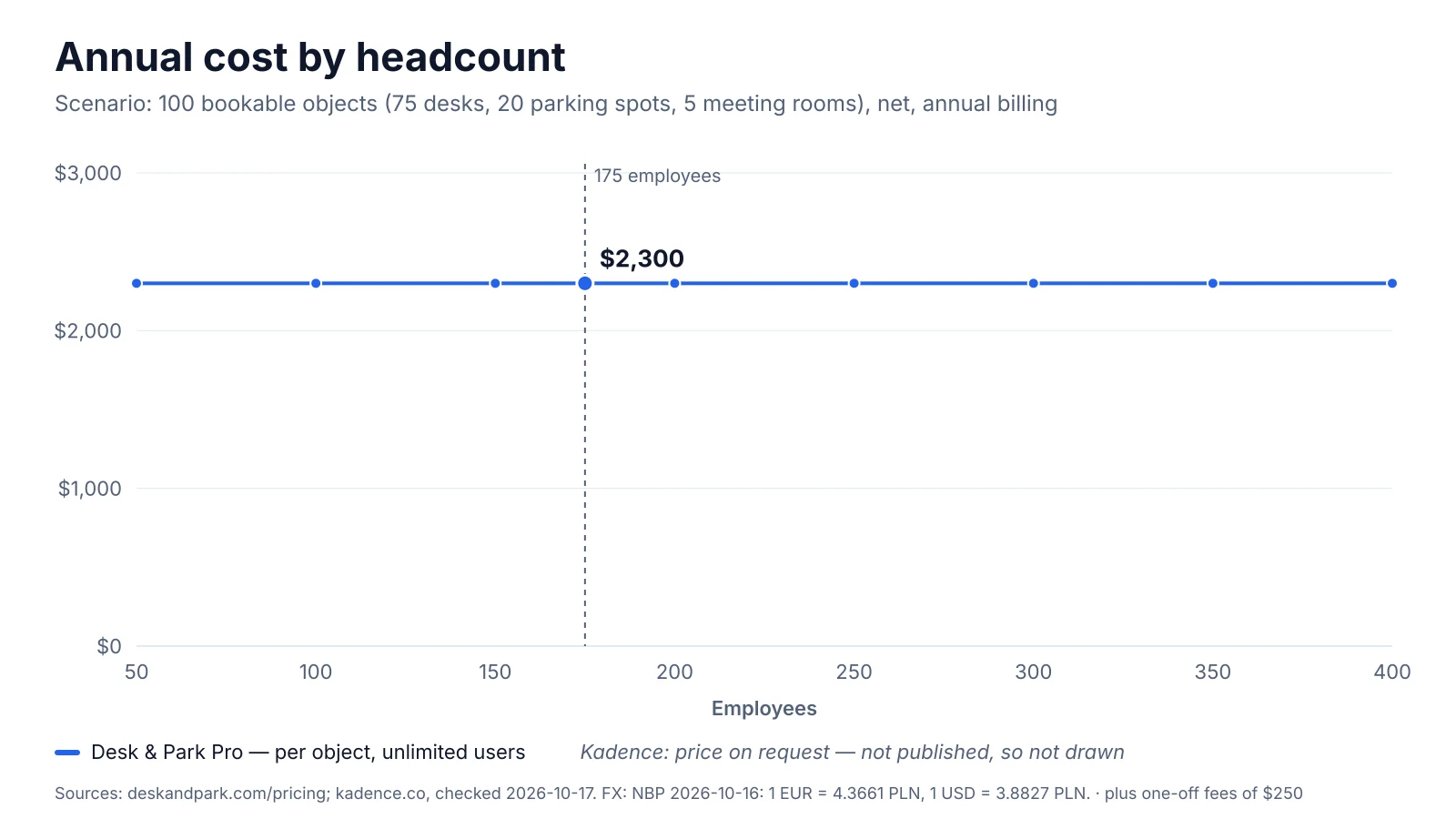
Annual cost as headcount grows: Desk & Park Pro for 100 objects against per-active-user billing. Kadence publishes no per-user rate, so its line is illustrative; the $250 per-floor set-up fee is from kadence.co/pricing (October 2026).
Pricing and total cost of ownership
What Kadence publishes
On its pricing page (checked 17 October 2026) Kadence states:
- Billing unit: active users — "you are charged for people who make a booking within the month".
- Term: a minimum of one year, billed annually.
- Set-up: "Floor plan upload and set-up is $250 per floor."
- Rate: not published. Every plan (WorkOps Team, WorkOps Pro, SpaceOps, Enterprise Bundle) is quoted, in local currency on request.
- Paid add-ons: editable floor plans and VMS Documents; Insights Plus is included in Pro and a paid add-on for Team.
The scenario
A company with 175 employees, 75 desks, 20 parking spots (4 with EV chargers) and 5 meeting rooms — 100 bookable objects in one office.
Desk & Park: the Pro plan covers up to 125 objects and 10 locations for 2,300 USD a year with annual billing, or 230 USD a month. Users are unlimited, so 175 employees cost the same as 250. There is no fee for floor plans or parking maps, and setup is self-serve.
Kadence: first-year cost = active users × quoted monthly rate × 12 + $250 × floors. With the office on one floor, the published one-off fee is $250; on two floors, $500. Whether a parking level counts as a floor is a question for the quote. The $250 alone equals about 11 % of a year of Desk & Park Pro (250 ÷ 2,300).
Break-even instead of a guess
Kadence publishes no rate, so we cannot state a difference in dollars or per cent, and we will not invent one. What can be calculated is the rate at which both cost the same:
| Active users per month | Kadence rate equal to Desk & Park Pro, year 1 (one $250 floor fee) | From year 2 (no set-up fee) |
|---|---|---|
| 175 (everyone books) | (2,300 − 250) ÷ (175 × 12) = 0.98 USD per user per month | 2,300 ÷ 2,100 = 1.10 USD |
| 120 (some never book) | 2,050 ÷ 1,440 = 1.42 USD | 2,300 ÷ 1,440 = 1.60 USD |
| 250 (after growth) | 2,050 ÷ 3,000 = 0.68 USD | 2,300 ÷ 3,000 = 0.77 USD |
Against your quote: above the threshold for your active-user count, Desk & Park Pro is cheaper for this office; below it, Kadence is. Active-user billing favours Kadence when many employees rarely book, because people who book nothing in a month are not charged.
The growth test: 175 → 250 people
Hire 75 people and keep the same office. Under per-active-user billing the bill can rise by up to 43 % (250 ÷ 175), depending on how many newcomers book. Under Desk & Park it does not move until the office grows past 125 objects, where a custom Enterprise contract starts. Desk & Park can also be paid monthly, while Kadence states a one-year minimum, and the free Start plan (10 objects, 1 location, no payment details) lets a team try the real product first. For European readers: 1 USD = 0.8893 EUR = 3.8827 PLN (NBP mid rate, table 202/A/NBP/2026, 16 October 2026).
Architecture and security
Desk & Park
- One PostgreSQL database per customer organisation: no tables shared with other customers, backups and erasure per organisation, and an incident in one database does not touch another (why it matters).
- EU hosting: databases in Frankfurt, application in the Netherlands; encrypted nightly backups and an audit log.
- Sign-in: two-factor (TOTP) and passkeys (WebAuthn) for every user, plus one-time e-mail codes.
- SSO via OpenID Connect (Microsoft Entra ID, Google Workspace, Okta, other OIDC providers) and SCIM provisioning and deprovisioning (Entra ID, Okta) on every plan, including the free one.
- GDPR: data export and deletion requests from settings, and a data processing agreement.
The honest gaps: Desk & Park supports OIDC only, not SAML, and ISO 27001 and SOC 2 are planned, not certified. If procurement needs a SOC 2 report today, Desk & Park cannot provide one yet.
Kadence (as published)
Kadence's pricing and security pages list SOC 2 Type II and Cyber Essentials certification; its infrastructure partners are ISO 27001 certified, and Kadence states it does not claim that certification as its own. Data is encrypted in transit (TLS 1.2 or later) and at rest, systems are penetration-tested at least annually by third parties, and mobile apps are tested to OWASP MASVS. Both WorkOps tiers include regional data hosting in the US or the EU, SSO and SCIM directory sync (Okta, Entra, Google, OneLogin, JumpCloud and others), mandatory SSO, passkey sign-in, PII retention controls and an Audit Export API with 180 days of history.
Kadence does not publish its tenancy model. If per-customer database isolation matters in your review, ask both vendors in writing: is our data in its own database or in shared tables?
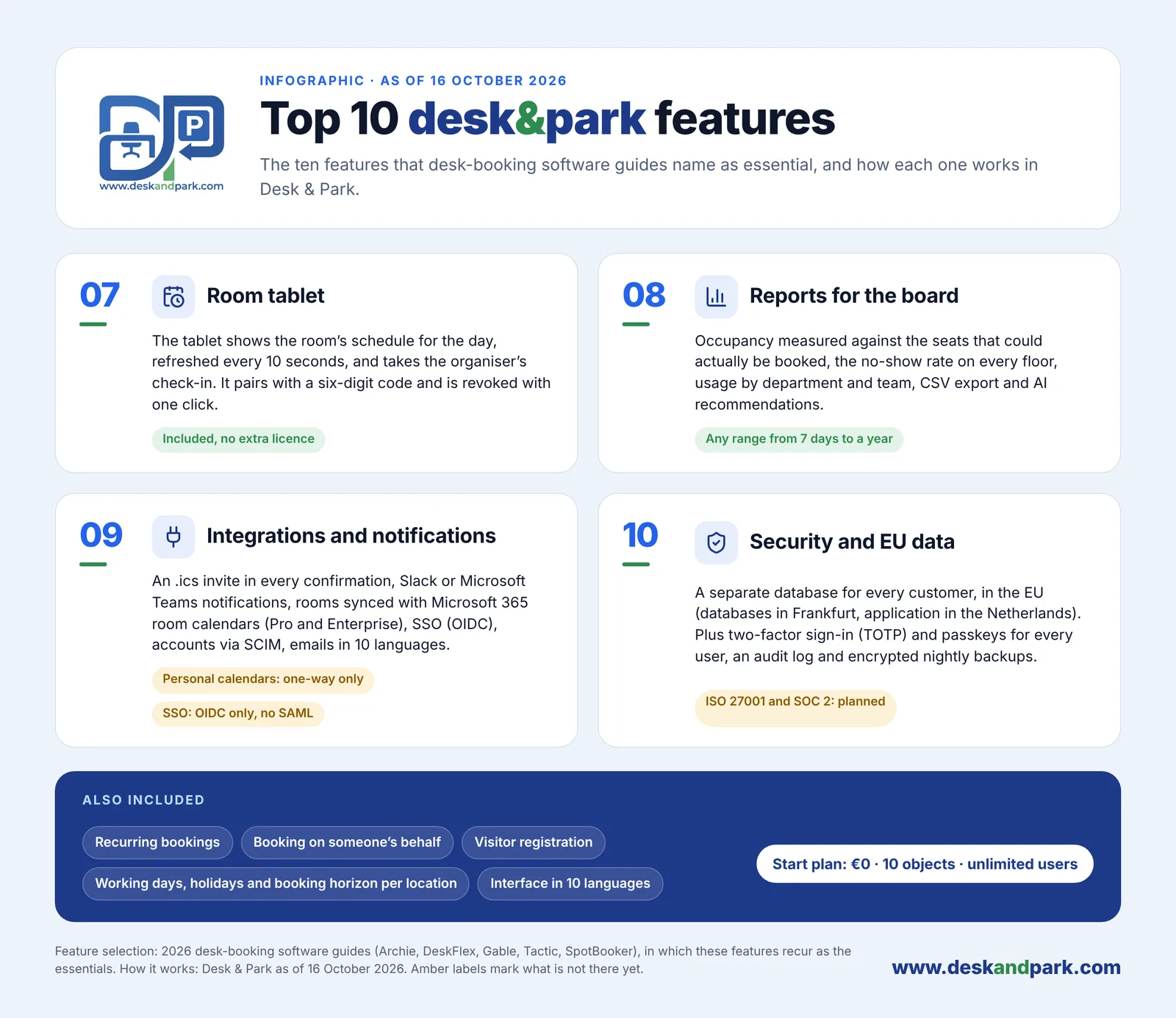
Features 07–10 of the Top 10 Desk & Park features: room tablet, Board Reports, integrations, security and EU data.
Employee experience and team coordination
Desk & Park runs in any browser and installs as a PWA; an Android app adds a native QR scanner, fingerprint or face unlock and push notifications. An iOS app is planned for 2027; until then iPhone users book from the browser (feature 05 of the Top 10). Employees pick a spot on a map colour-coded by availability (feature 01), and scanning the QR sticker of a free desk books it and checks you in with one tap (feature 02).
- Who's in the office (feature 04): booked colleagues appear on the map with their photo or initials ringed in their team colour, a green dot once checked in, and a roster by team beside it. The company can switch it off and anyone can hide themselves.
- Desks, parking and rooms in one app (feature 03): parking has its own maps, with several areas per location such as a garage and a lot; EV charger spots are marked ⚡; a desk and a parking spot booked together arrive as one calendar invitation. See parking booking.
- Assigned spaces you can hand back (feature 06): board members keep a permanent desk or spot; "I'm away today" releases it for the day and "Take back" reverses it until someone claims it. Permanent spaces are never released automatically.
- Integrations (feature 09): a calendar invite in every confirmation, Slack or Microsoft Teams notifications, and two-way room calendar sync with Microsoft 365 or Google Workspace on Pro and Enterprise.
- Recurring bookings, booking on someone's behalf, guest bookings without user accounts, and 10 interface languages.
Kadence lists a native Android app and a rebuilt iOS booking flow, web booking, apps for Microsoft Teams, Microsoft 365, Slack and Google Calendar, an Outlook add-in, and Kadence AI for booking by chat; its MCP server (early access) books from Claude, ChatGPT or Copilot. Coordination features include starred colleagues, smart suggestions and an incognito mode. Lockers, pods, parking and private offices are bookable, with neighbourhoods, assigned and preferred desks and booking credits. Visitor management is in both tiers, the kiosk with badge printing in Pro, and the interface comes in 38 languages. The pricing page does not describe EV charger spots; ask if that matters.
Space optimisation and AI
Ghost bookings — desks booked and never used — make a hybrid office look full in the system and half-empty in reality.
Desk & Park uses QR check-in and auto-release: a desk or parking booking not checked in by the organisation's deadline (for example "check in by 10:00") returns to the pool automatically. Meeting rooms are released only if the organisation turns that on (off by default, after 5 to 120 minutes without a check-in); scanning a free room's QR code books the next half hour. The ghost bookings article shows the effect.
Board Reports (feature 08) measure occupancy against the seats that could actually be booked, the no-show rate per floor and resource, usage by department and team, EV charging demand and the peak day, for 7 days to a year, with CSV export. AI recommendations: an admin clicks "Generate report"; a large language model receives aggregates only, no employee names, and returns 3–6 recommendations (cost saving, space consolidation, EV optimisation, ghost booking alerts, board member impact, ESG, capacity planning) with a model-written impact estimate. The board dismisses them or marks them done, and that is audited. This is not predictive machine learning or occupancy forecasting, and Desk & Park does not calculate savings or costs; the impact estimate is a hypothesis to verify.
Kadence offers auto-release and check-in plus the Kadence Agent, a desktop agent that detects office presence over Wi-Fi and checks people in without sensors, creating a booking when someone arrives without one. Check-ins can also come from kiosks, room displays, badge data or the API. Workplace Insights covers attendance, occupancy, no-shows, heatmaps, average weekly hours and CSV export; Insights Plus adds custom dashboards. SpaceOps goes beyond anything Desk & Park offers: an AI planning agent, auto-stack, side-by-side scenarios and guided workflows to restack or consolidate floors.
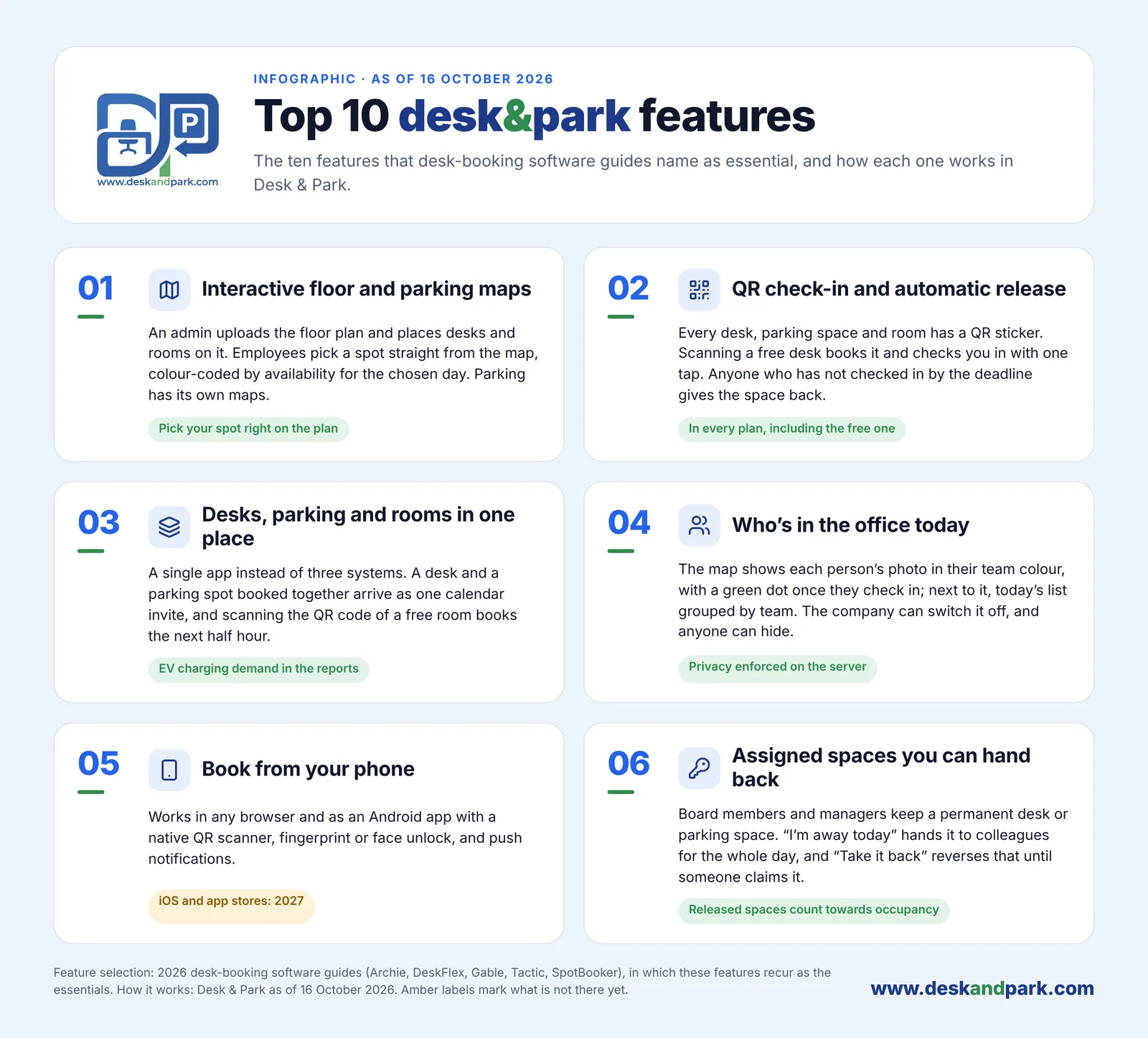
Features 01–06 of the Top 10: the everyday side of Desk & Park, from the map to assigned spaces you can hand back.
Desk & Park vs Kadence side by side
| Desk & Park | Kadence | |
|---|---|---|
| Pricing unit | Per bookable object; users unlimited | Per active user (people who book in a month) |
| Entry price | Start: 0 USD, 10 objects, 1 location | Not published; quote for every plan |
| Billing and term | Monthly or annual | Minimum one year, billed annually |
| Scenario: 100 objects, 175 people | Pro: 2,300 USD per year | Not computable; break-even 0.98–1.10 USD per active user per month |
| Set-up and one-off fees | None; self-serve, 60–90 minutes per office | $250 per floor for floor-plan upload and set-up |
| Data isolation | One PostgreSQL database per organisation | Not published |
| Hosting region | EU (Frankfurt, Netherlands) | US or EU |
| Certifications | ISO 27001 and SOC 2 planned, not certified | SOC 2 Type II, Cyber Essentials |
| SSO and SCIM | OIDC and SCIM on every plan, incl. free; no SAML | SSO and SCIM on Team and Pro |
| Mobile apps | Browser/PWA and Android; iOS in 2027 | Native Android and iOS, web |
| Parking and EV | Parking maps, EV spots marked, EV demand in reports | Parking bookable; EV not described |
| QR check-in and auto-release | Yes, every desk, spot and room | Auto-release, QR booking links, Wi-Fi agent check-in |
| Room tablet | Included | Room Displays in Pro |
| Reports and AI | Board Reports, LLM recommendations from aggregates | Workplace Insights, Insights Plus, SpaceOps AI planning |
| Integrations | Calendar invites, Slack/Teams, room calendar sync (Pro+), OIDC, SCIM | Teams, Microsoft 365, Slack, Google, Outlook add-in, API, webhooks, HRIS in Pro |
| Languages | 10 | 38 |
Kadence facts from kadence.co (pricing and security pages), checked October 2026; prices and features change — check the current page.
Verdict
Kadence is the better fit for a large, multi-building organisation that needs SOC 2 Type II and Cyber Essentials for procurement today, wants US hosting or native iOS and Android apps now, prefers Wi-Fi presence detection to QR codes, runs visitor kiosks with badge printing, seats people from an HRIS (Workday, BambooHR, HiBob) with a Move Manager, and plans its portfolio with scenario and stack planning. Its quotes also cover implementation and customer success.
Desk & Park is the better fit for a company with one to ten offices that wants desks, parking, EV chargers and rooms on one map; a budget that does not move with headcount; EU-only hosting with a dedicated database per customer; SSO and SCIM even on the free plan; and a setup one administrator finishes in 60–90 minutes. Compare the pricing, see desk booking, and read the corporate parking management guide.
FAQ
Is Desk & Park cheaper than Kadence?
For 100 bookable objects and 175 employees, Desk & Park Pro costs 2,300 USD a year with unlimited users. Kadence publishes no per-user rate, so it depends on the quote: above about 1.10 USD per active user per month (0.98 USD in year 1, counting one $250 floor fee), Desk & Park is cheaper. The gap grows with headcount, because Desk & Park costs the same for 175 or 250 people.
How does Kadence bill?
According to kadence.co in October 2026, Kadence charges per active user, meaning people who make a booking within the month. Contracts run for at least one year, billed annually, and prices are quoted rather than published.
Does Kadence charge for floor plans?
Yes. Its pricing page states that floor plan upload and set-up costs $250 per floor, and editable floor plans are a paid add-on in WorkOps Pro (included with SpaceOps). Desk & Park charges nothing for uploading a plan image or adding parking maps.
Which platform has stronger security certifications?
Kadence publishes SOC 2 Type II and Cyber Essentials and offers US or EU hosting. Desk & Park is not yet certified (ISO 27001 and SOC 2 are planned) but gives every customer its own PostgreSQL database in the EU, with OIDC single sign-on and SCIM on every plan, including the free one.
Can both platforms handle parking and EV charging spots?
Both make parking spots bookable. Desk & Park puts parking on its own maps, marks EV charger spots with ⚡, sends a desk and a parking spot as one calendar invitation and reports EV charging demand. Kadence lists parking among its bookable spaces; its pricing page does not describe EV charger spots.
#DeskAndPark#Comparison#Kadence#DeskBookingPricing#HybridOffice#ParkingBooking
Ask AI about this article
Get a summary or a second opinion: each button opens the assistant with a question about this article.