- comparison
- officespace
- iwms
- desk booking
- parking booking
- hybrid office
Desk & Park vs OfficeSpace: self-serve vs enterprise IWMS
OfficeSpace quotes enterprise contracts with a 35-day rollout; Desk & Park lists 2,300 USD a year for 100 desks, spots and rooms, set up in an afternoon.
The main difference between Desk & Park and OfficeSpace Software is scope and the way you buy it. OfficeSpace is an enterprise workplace platform (space planning, move management, visitors, service requests, assets, desk and room booking) sold through a quoted annual agreement with a 35-day implementation included; it publishes no price and names enterprises of 1,000+ employees with multi-site portfolios as its best fit (officespacesoftware.com, October 2026). Desk & Park is a self-serve booking app for desks, parking spots and meeting rooms, priced per bookable object with unlimited users: 100 objects cost 2,300 USD a year on the Pro plan, and one admin sets up an office in 60–90 minutes.
Two different products for the same hybrid office
Most hybrid offices in 2026 show the same rhythm: Tuesday to Thursday are full, Monday and Friday are half empty, and the car park runs out before the desks do.
OfficeSpace Software has been in the market since 2006 and describes itself as a workplace management platform with AI agents. Its plans page lists two Workplace plans, Essentials Plus and Pro Plus, plus separate Asset Management plans. Beyond desk and room booking, it covers stack and scenario planning, move management, visitors and deliveries, service requests, lease tracking, badge/Wi-Fi/sensor integrations and portfolio analytics: an IWMS-class tool for real estate teams managing many sites.
Desk & Park does one job: employees book a desk, a parking spot (including EV charger spots) or a meeting room on a floor-plan map, check in with a QR sticker, and the board sees what is actually used. It is the same core product on every plan, from the free Start plan to Enterprise.
So the honest question is not "which is better" but "do you need an IWMS, or do you need desk and parking booking that works next week?"
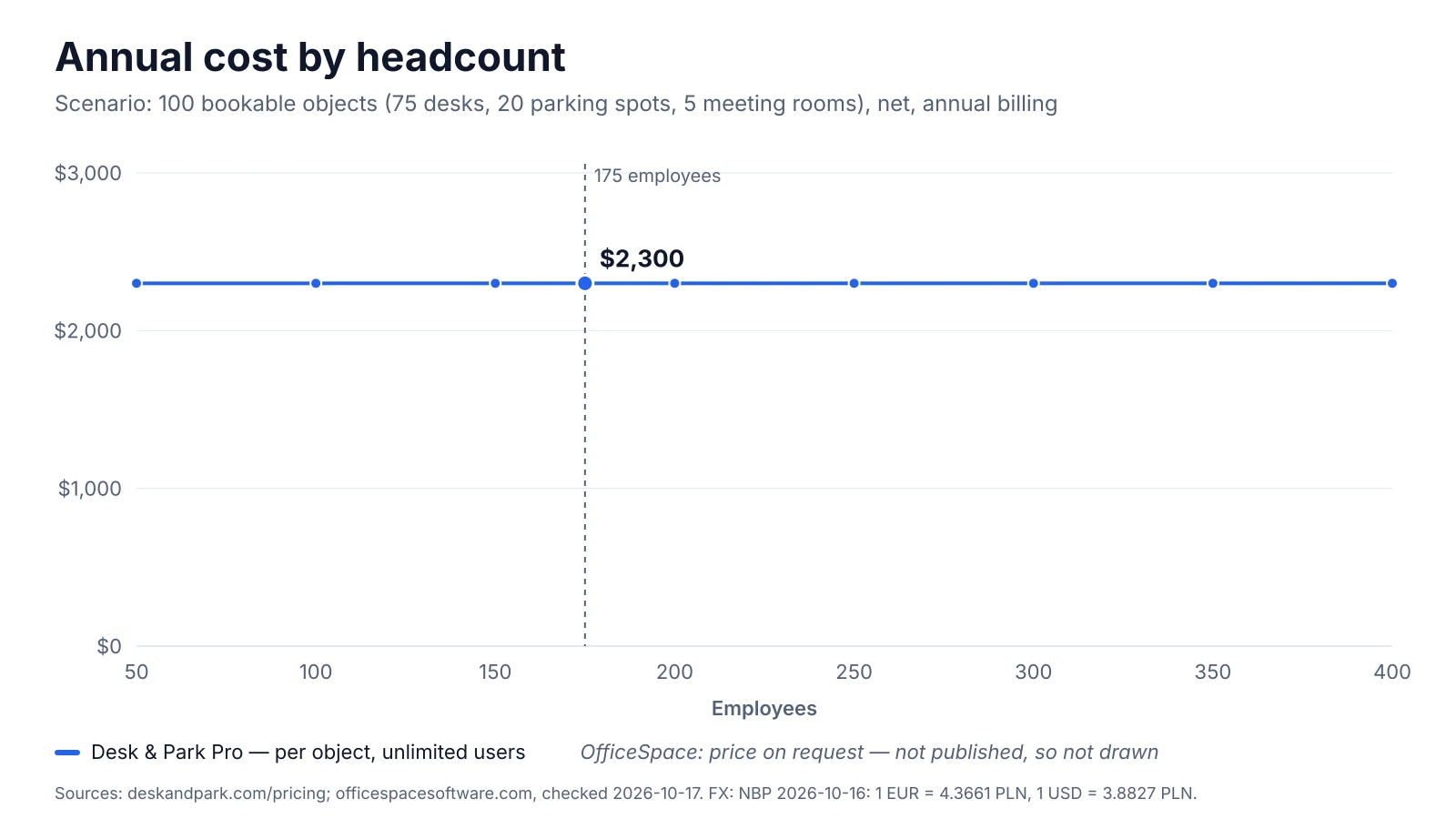
Desk & Park Pro stays at 2,300 USD a year from 50 to 400 employees in the 100-object scenario. OfficeSpace prices on request, so the chart draws no line for it rather than an invented one.
Pricing and TCO: a published price vs a quote
The scenario. A company with 175 employees, 75 desks, 20 parking spots (4 of them with EV chargers) and 5 meeting rooms: 100 bookable objects in total.
Desk & Park. 100 objects fit the Pro plan (up to 125 objects, 10 locations): 2,300 USD a year with annual billing, or 230 USD a month on monthly billing, net. Users are unlimited, so the 175 people cost nothing extra. There is no fee for uploading floor plans and no implementation project. See pricing.
OfficeSpace. OfficeSpace publishes no price on its website (checked 17 October 2026). Both Workplace plans end with "Talk To Us". What it does publish is the structure:
- "Each plan has a fixed platform fee and includes a designated feature set and synced employee count per plan. You can add additional synced employees at any time, charged at a per/employee amount" (plans page FAQ).
- Its comparison pages describe "an annual enterprise agreement scoped to your employees synced and chosen modules", with implementation included in the contract, contracts that are "flexible, typically multi year with documented price protection", and no per-floor-plan upload fee.
So for the scenario there is no published figure to multiply, and we will not estimate one. Year-one cost for OfficeSpace = platform fee + synced employees above the plan's included count + chosen modules; implementation is inside that quote. If you receive a quote in USD and budget in another currency, the NBP mid rate of 16 October 2026 is 1 USD = 0.8893 EUR = 3.8827 PLN.
What happens when the company grows. Take the same office and grow from 175 to 250 people without adding desks.
| 175 employees | 250 employees | |
|---|---|---|
| Desk & Park (100 objects, Pro, annual) | 2,300 USD | 2,300 USD |
| OfficeSpace | Quote: platform fee + synced employees | Quote: 75 more synced employees, each "charged at a per/employee amount" not published |
In Desk & Park the bill moves only when the office changes: going beyond 125 objects means moving to Enterprise. In OfficeSpace's published model the bill is tied to the employee count, which is what hybrid companies control least. For a 175-person office that is also well below the 1,000+ employees OfficeSpace names as its best-fit customer.
Architecture and security
Desk & Park (feature 10 of the Top 10 Desk & Park features):
- One PostgreSQL database per customer organisation. Your users, bookings, maps and audit log are not rows in tables shared with other customers; backups and erasure are per organisation, and an incident in one database does not touch another. More in why an isolated database per organisation matters.
- EU hosting: databases in Frankfurt, application in the Netherlands. Encrypted nightly backups.
- Sign-in: one-time e-mail code, two-factor (TOTP) and passkeys (WebAuthn) for every user.
- SSO via OpenID Connect (Microsoft Entra ID, Google Workspace, Okta and other OIDC providers) and SCIM provisioning and deprovisioning (Entra ID, Okta) — on every plan, including the free one.
- Audit log of who did what; GDPR data export and deletion request in settings; a DPA.
- The honest gaps: no SAML (OpenID Connect only), and ISO 27001 and SOC 2 are planned, not certified.
OfficeSpace, per its own pages (October 2026):
- Certifications: its comparison pages list SOC 2 Type II: Yes and ISO 27001: Yes, plus GDPR and SCC support; the security page adds that its infrastructure "is hosted by SSAE 16/18 and ISO 27001-compliant providers". Detailed documentation is in its Trust Center under NDA.
- Encryption: TLS 1.2 or newer in transit, AES-256 at rest.
- Identity: SAML SSO with up to 10 identity providers, per its help center (Okta, Azure AD, Google, OneLogin, Ping Identity, Shibboleth and others are listed), and a comparison-page row labelled "SSO, SCIM, and SAML". The plans page does not state in text which plan includes which identity feature — ask.
- Data location: client data is stored "in the United States by default, but clients may elect to have their data stored in several geographical regions including the EU, Canada, or Australia" (client privacy policy).
- Tenancy: the security page lists "data segregation" among its practices; it does not publish whether each customer has a separate database.
If your procurement checklist requires SAML or an existing SOC 2 Type II report today, OfficeSpace meets it and Desk & Park does not yet. If it requires EU hosting by default and per-customer database isolation you can verify in writing, Desk & Park answers that directly; for OfficeSpace, ask for the EU region in the contract and for its tenancy model in writing.
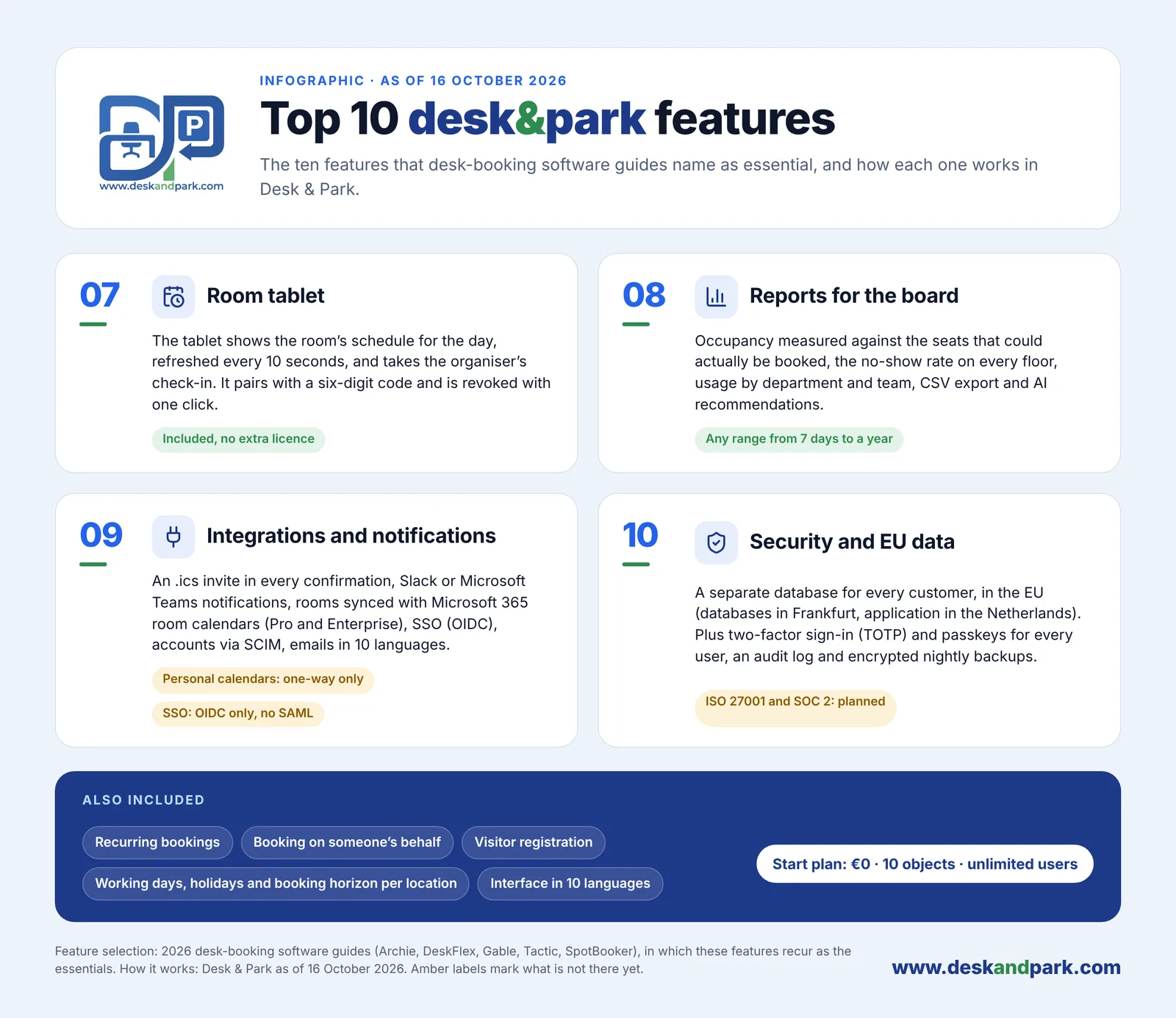
Features 07–10 of the Top 10: the room tablet, Board Reports with AI recommendations, calendar and chat integrations, and security with EU data.
Employee experience and team coordination
Desk & Park runs in any browser and installs as a PWA, so nothing comes from an app store; an Android app adds a native QR scanner, fingerprint or face unlock and push notifications. An iOS app and app-store distribution are planned for 2027. In everyday use:
- The map (feature 01): pick a desk, parking spot or room on the floor plan, colour-coded by availability for the chosen day. Recurring bookings, booking on behalf of a colleague, and guest bookings without user accounts.
- Desks, parking and rooms in one app (feature 03): a desk and a parking spot booked together arrive as one calendar invitation. Parking has its own maps (several areas per location, e.g. garage and lot), EV charger spots are marked ⚡, and EV charging demand shows up in reports. The parking booking page covers the details.
- Who's in the office (feature 04): each booked person's photo or initials on the map, ringed in their team colour, with a green dot after check-in, and today's roster grouped by team. The company can switch it off and any person can hide themselves.
- Assigned spaces you can hand back (feature 06): board members (and managers on Enterprise) keep a permanent desk or parking spot; "I'm away today" releases it to colleagues for the day, "Take back" reverses it until someone claims it.
- Interface and e-mails in 10 languages.
OfficeSpace publishes a broader employee toolkit: iOS and Android apps, booking from Slack, Microsoft Teams, Outlook and Google, a "who's in" summary, an employee directory, wayfinding, suggested in-office days, AI desk recommendations and booking nudges on badge or Wi-Fi arrival. Admins can temporarily make assigned desks bookable. Multi-language settings are applied at user level; the number of languages is not published. Its plans page does not list parking or EV charger spots as a module, so if parking is part of your problem, ask how it is modelled.
Space optimisation and AI
Ghost bookings — a desk booked and never used — are what make a half-empty office feel full. Desk & Park handles them with QR check-in and auto-release (feature 02 of the Top 10): every desk, parking spot and room has a QR sticker; scanning a free desk books it and checks you in with one tap, and a desk or parking booking not checked in by the organisation's deadline (for example 10:00) goes back to the pool automatically. Meeting rooms are released only if the organisation turns that on (off by default, after 5 to 120 minutes without a check-in). See how auto-release frees office space.
Board Reports (feature 08) measure occupancy against the seats that could actually be booked, the no-show rate per floor and resource, usage by department and team, EV charging demand and the peak day, for any range from 7 days to a year, with CSV export. AI recommendations: an admin clicks "Generate report", a large language model receives aggregates only (no employee names) and returns 3–6 recommendations — cost saving, space consolidation, EV optimisation, ghost booking alerts, board member impact, ESG, capacity planning — each with a model-written impact estimate that the board triages (Dismiss / Mark as done, audited). It is not predictive forecasting, and Desk & Park does not calculate costs or savings: the estimate is a hypothesis to verify.
OfficeSpace goes much further on the real-estate side: named AI agents (Space Planning, Workplace Experience and Insights are live per its comparison page), plain-language utilization questions answered with charts, AI-driven stack plans and "what if" scenarios, demand forecasting by space type and headcount, Looker dashboards combining badge, Wi-Fi and booking data, and industry benchmarks. Its plans page marks AI utilization forecasting and anomaly alerts as "coming soon". If you plan restacks across a portfolio, that is a capability Desk & Park does not offer.
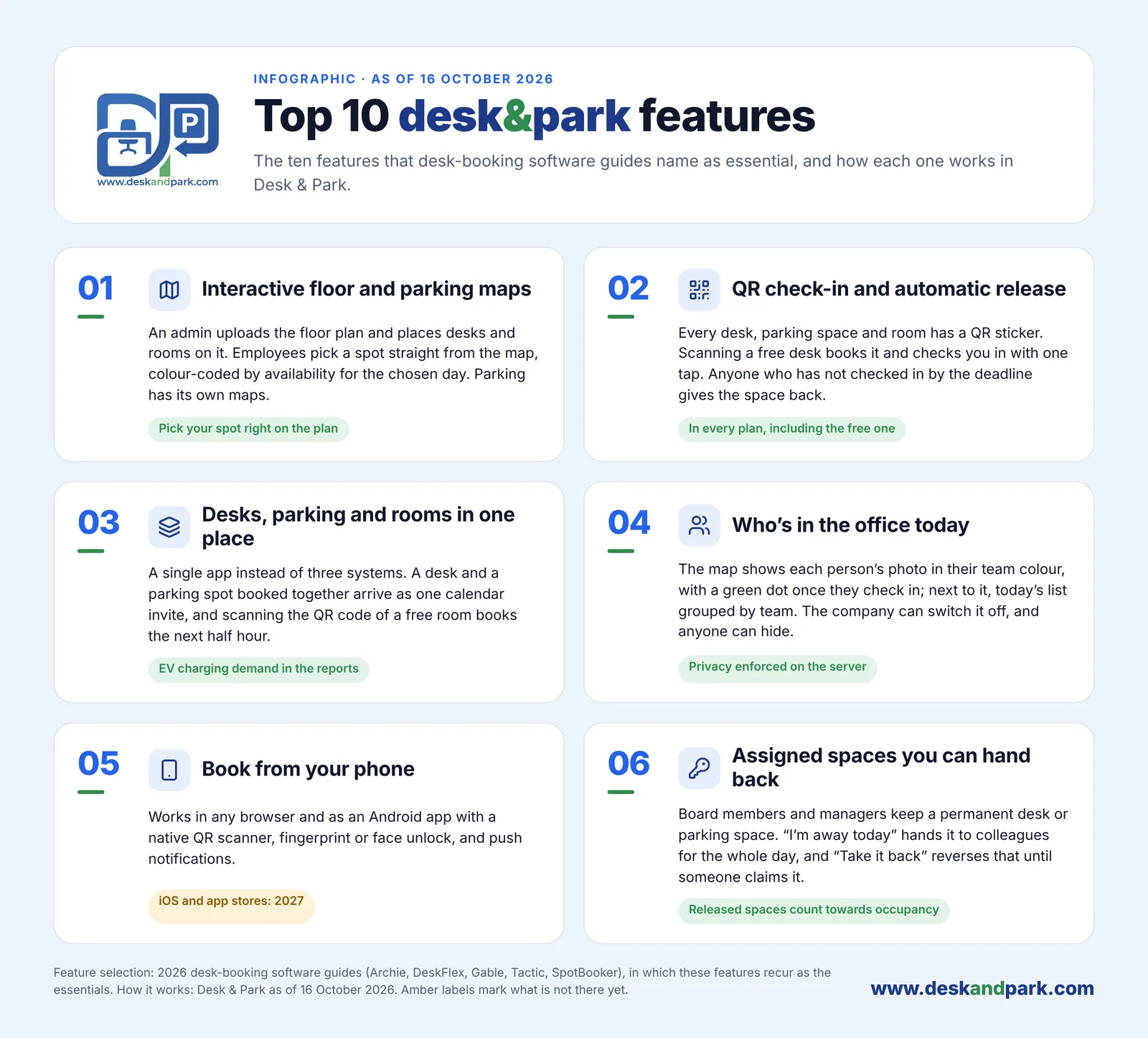
Features 01–06 of the Top 10: what employees use every day, from the map and the QR sticker to handing back an assigned spot.
Side by side
| Desk & Park | OfficeSpace Software | |
|---|---|---|
| Pricing unit | Per bookable object (desk, parking spot, room); unlimited users | Fixed platform fee per plan with an included synced employee count; extra employees per employee; modules |
| Entry price | Start: 0 USD, up to 10 objects, 1 location | Not published ("Talk To Us") |
| TCO, 100 objects / 175 people | 2,300 USD a year (Pro, annual) | Price on request |
| Setup and one-off fees | None; self-serve, 60–90 minutes per office | Implementation included in the contract; ~35-day path with project and technical managers |
| Data isolation | One PostgreSQL database per organisation | Not published ("data segregation" listed as a practice) |
| Hosting region | EU: Frankfurt (data), Netherlands (app) | US by default; EU, Canada or Australia on election |
| Certifications | ISO 27001 and SOC 2 planned, not certified | SOC 2 Type II and ISO 27001 listed |
| SSO / SCIM | OIDC SSO and SCIM on every plan; no SAML | SSO with many IdPs, SAML; "SSO, SCIM, and SAML" listed; plan tier not stated |
| Mobile apps | Web/PWA + Android; iOS in 2027 | iOS and Android |
| Parking / EV | Parking maps, EV spots ⚡, EV demand in reports | Not listed as a module on the plans page |
| QR check-in and auto-release | Yes, per-organisation deadline | Check-in and auto-release listed; badge, Wi-Fi and sensor check-in |
| Room tablet | Included, no extra licence | Room displays and kiosks listed |
| Reports / AI | Board Reports, LLM recommendations from aggregates | Analytics, Looker dashboards, AI agents, scenario planning |
| Languages | 10 | Multi-language; number not published |
Competitor facts from officespacesoftware.com, checked October 2026; prices and features change — check the current page.
Verdict
OfficeSpace is the better fit if you run a multi-site portfolio, plan restacks and moves, want visitor management, deliveries, service requests and asset tracking in the same platform, need SAML or an existing SOC 2 Type II and ISO 27001 report today, and want a vendor-led implementation with training and a client success manager. Its own pages name enterprises of 1,000+ employees as the best fit; at that scale a 35-day project buys real depth.
Desk & Park is the better fit if the problem is desks, parking spots and meeting rooms in one or a few offices; you want a published price that does not move with headcount (2,300 USD a year for 100 objects); parking and EV chargers matter as much as desks; your data should stay in the EU in its own database; and one person should have it running this week. Start with the onboarding guide, check the pricing, and compare with Desk & Park vs deskbird for a per-user tool closer in size.
FAQ
How much does OfficeSpace Software cost compared with Desk & Park?
OfficeSpace does not publish prices; per its plans page in October 2026, each plan has a fixed platform fee with an included synced employee count, and extra employees are charged per employee. Desk & Park publishes its price: 100 desks, parking spots and rooms cost 2,300 USD a year on the Pro plan with unlimited users. Ask OfficeSpace for a written quote for your headcount and modules to compare.
How long does it take to implement OfficeSpace vs Desk & Park?
OfficeSpace publishes a structured implementation of about 35 days, included in the contract, with project and technical managers and live training. Desk & Park is set up by one admin in six self-serve steps, which the onboarding guide puts at 60–90 minutes for one office.
Does OfficeSpace or Desk & Park support SAML and SOC 2?
OfficeSpace lists SAML-based SSO, SOC 2 Type II and ISO 27001 on its website. Desk & Park supports SSO via OpenID Connect and SCIM on every plan, including the free one, but not SAML; its ISO 27001 and SOC 2 certifications are planned, not yet obtained.
Where is the data stored?
OfficeSpace stores client data in the United States by default, and clients may elect the EU, Canada or Australia, per its client privacy policy. Desk & Park hosts every customer in the EU, with one PostgreSQL database per organisation in Frankfurt and the application in the Netherlands.
Can Desk & Park replace OfficeSpace?
For desk, parking and meeting room booking with QR check-in, auto-release and occupancy reports, yes. For stack planning, move management, visitor kiosks, deliveries, service requests and asset management, no — those are OfficeSpace modules that Desk & Park does not offer.
#DeskAndPark#Comparison#Officespace#Iwms#DeskBooking#ParkingBooking#HybridOffice
Ask AI about this article
Get a summary or a second opinion: each button opens the assistant with a question about this article.