- analytics
- right-sizing
- hybrid office
- board reports
How Many Desks Does a Department Really Need?
Finance wants more desks, Sales won't give up its own. How to size each department from its busy day, its sharing ratio and real attendance data.
Imagine Marta. She runs facilities for a 260-person company with 150 desks on two floors. In the same week two e-mails land in her inbox. The head of Finance writes that her team "is always full on Tuesdays" and needs ten more desks. The head of Sales replies to a different thread: his 22 permanent desks are not negotiable, because "the team has to sit together".
Both might be right. Marta has a floor plan, an old seating spreadsheet and a feeling. What she lacks is a number she can show both department heads: this is what your department actually uses on a busy day. Here is how she gets it in Desk & Park, and what the report does not do for her.
Step 1: open the department view for a long enough period
In Board Reports, Marta sets the reporting period to Last 3 Months. Seven days is too noisy for a sizing decision: one offsite or bank holiday distorts it. If the company has several offices, she can narrow the report to one location.
She scrolls to Usage by Department & Team and keeps the Desks tab selected. Parking and meeting rooms have their own tabs on purpose: they are separate decisions, and a number that adds desks, parking and rooms together answers none of them.
Step 2: read the decision columns
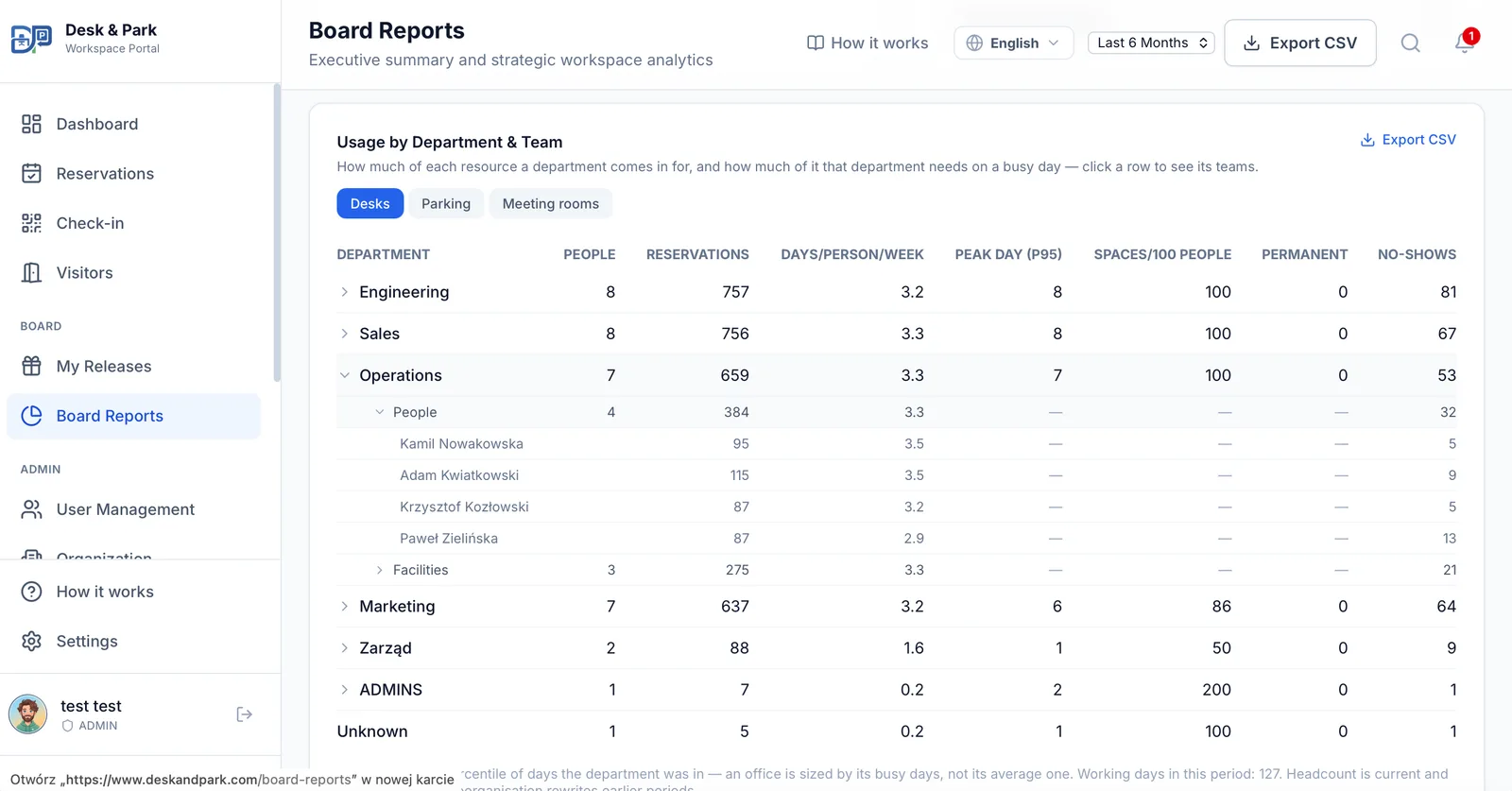
Each department gets one row:
| Column | What it tells Marta |
|---|---|
| People | Headcount: the department's active accounts today |
| Reservations, Hours, No-shows | Booking volume, and how much of it was never used |
| Days/person/week | Attended days per person, normalised to a five-day week |
| Peak day (P95) | How many desks the department occupied on its busy days |
| Spaces/100 people | The sharing ratio: the P95 peak divided by headcount |
| Permanent | Desks permanently assigned to its people, and the day-slots they released back to the pool |
The column that answers "how many desks?" is Peak day (P95). It is not the average day, because an office sized for the average is too small half the week. It is not the single fullest day either, because one all-hands Tuesday should not set the floor plan. It is the 95th percentile: on 95 % of the days the department was in, it occupied at most that many desks. The tooltip also shows the fullest single day, so Marta can see how far the outlier sits from a normal busy day.
Two details make the number worth trusting. The peak counts checked-in bookings only, so a desk that was booked and never used does not inflate a department's need; it appears under No-shows instead. And only finished days count, because a morning that is still filling up is not a peak.
Step 3: reason from the P95 and the sharing ratio
Here is what Marta's table might look like. The numbers are made up for the example:
| Department | People | Days/person/week | Peak day (P95) | Spaces/100 people | Permanent |
|---|---|---|---|---|---|
| Finance | 34 | 2.9 | 27 | 79 | 0 |
| Sales | 40 | 1.4 | 14 | 35 | 22 |
| Engineering | 70 | 1.8 | 38 | 54 | 2 |
Read against the two e-mails:
- Finance comes in often, and its busy day really is busy: 27 desks for 34 people. If its area holds 20 desks today, the complaint is fair. Sizing to the P95 plus a small buffer, around 28–30 desks, is an answer Marta can defend. Ten desks on top of what Finance already has may be more than it needs.
- Sales occupies 14 bookable desks on a busy day, but it also holds 22 permanent desks the report cannot see into. Someone with a permanent desk books nothing and checks into nothing, so whether they sat there is not measurable. What Marta can see is the released day-slots: if the Sales desks are released often, their holders are often away. That starts a conversation. It does not settle one.
- Engineering, at 54 spaces per 100 people, can share comfortably. An area of roughly half its headcount covers its busy days.
The arithmetic is Marta's. The app does not suggest a desk count; it gives her inputs nobody can argue with.
Two traps are worth knowing about:
- Department peaks do not add up to the office peak. Departments have their busy days on different weekdays, so adding up every department's P95 overstates what the whole floor needs. For the office as a whole, use the workspace utilisation figures and the weekday chart.
- A department's peak is not the sum of its teams' peaks. Clicking a department row opens its teams, which helps to see who drives the volume, but the P95 and the sharing ratio are measured per department only.
Step 4: check the denominator
Utilisation in the report is capacity-weighted: seats used divided by seats that could actually be booked. Desks permanently assigned and not released, and desks out of service, are left out of the bookable count and named separately under the Workspace Utilization figure. That matters when right-sizing. A floor that looks "80 % used" may be 80 % of a pool that is only half the floor.
Headcount is current, so a reorganisation rewrites earlier periods. Keep that in mind when reading a long period after a restructuring. A department that has people but booked nothing still appears in the table with zeros, and that row is often the most useful one.
Step 5: watch it move
Sizing is not a one-off. The Monthly Utilization Trend shows whether the office is filling up or emptying, and Usage by Floor compares each floor's ghost rate with the previous period. The department table and the summary figures export to CSV for the slide Marta takes to the leadership meeting.
If she wants a second pair of eyes, an admin can generate AI recommendations for the board. They read the same department aggregates, including the sharing ratio and the P95 peak, and they are suggestions to verify, not answers.
Practical tips
- Use at least three months of data. Avoid periods with long holidays, unless holidays are what you are sizing for.
- Fix no-shows first. With check-in and automatic release in place, bookings reflect people who actually came, and the report shows how many did not.
- Keep departments tidy. The department is a field on each user, set by admins or synced from your identity provider. A typo creates a phantom department.
- Choose the buffer on purpose. P95 means roughly one busy day in twenty is fuller. Decide whether a shared overflow area or the department itself absorbs that day.
Scope: what this report does not do
It measures; it does not forecast. There is no simulation of "what if we had 120 desks", no cost per desk in money, no savings calculation and no hourly heatmap. The P95 and the sharing ratio describe the period you picked; the decision about next quarter stays with you. For what to measure in a hybrid office in general, see Measuring Real Office Occupancy.
FAQ
What is the P95 peak day?
It is the 95th percentile of the days a department was in the office: on 95 % of those days the department occupied at most that many desks. It ignores the rare outlier but still covers the busy days, which makes it a better basis for sizing than the average or the single fullest day.
What does "Spaces/100 people" mean?
It is the sharing ratio: the department's P95 peak divided by its headcount, shown per 100 people. A value of 54 means that on a busy day the department needs about 54 desks for every 100 people in it.
Do no-shows count towards a department's peak?
No. The peak counts checked-in bookings on finished days only. Bookings that were never used are reported separately as no-shows, so they do not make a department look bigger than it is.
Can we see whether people with permanent desks use them?
Not directly: someone with a permanent desk books nothing and checks into nothing, so their presence cannot be measured. The report shows how many permanent desks each department holds and how many day-slots their holders released back to the pool.
Does Desk & Park tell us how many desks to remove?
No. The report gives the measurements (P95 peak, sharing ratio, days per person, no-shows, permanent desks); the sizing decision is yours. There is no forecasting, simulation or cost calculation.
#DeskAndPark#Analytics#RightSizing#HybridOffice#BoardReports
Ask AI about this article
Get a summary or a second opinion: each button opens the assistant with a question about this article.