- comparison
- joan
- room displays
- pricing
- desk booking
- hybrid office
Desk & Park vs Joan: e-paper displays vs per-space pricing
Joan bills per user and per device and sells e-paper room displays; Desk & Park bills per bookable space. TCO for 175 people, security and fit compared.
The main difference between Desk & Park and Joan is what you pay for. Joan bills per user and per device: plans start at $51 per month, each additional user costs $1.09 and each additional display licence $10.99 per month with annual billing, and its wireless e-paper room displays are sold separately (Joan 6 RE: $399 excluding tax, per getjoan.com in October 2026). Desk & Park bills per bookable space with unlimited users: up to 125 desks, parking spots and meeting rooms cost 2,300 USD per year on the Pro plan. For a 175-person office with 100 bookable objects, Joan's published floor is $2,639.40 per year before any display, about 15 % more than Desk & Park, and the gap grows with every hire. Joan's dedicated door displays, on the other hand, have no equivalent in Desk & Park.
Hybrid offices in 2026 are commonly full from Tuesday to Thursday and half empty on Mondays and Fridays. The desks, spots and rooms are fixed by the lease; the people who book them change every quarter.
Joan is made by Visionect d.o.o. of Ljubljana, Slovenia (founded 2007), best known for battery-powered e-paper room displays, and is now an all-in-one platform: rooms, desks, parking, visitors, digital signage and analytics in every package. Desk & Park is built around the floor plan: desks, parking with EV chargers and rooms on one map, booked from a phone browser, checked in with a QR sticker.
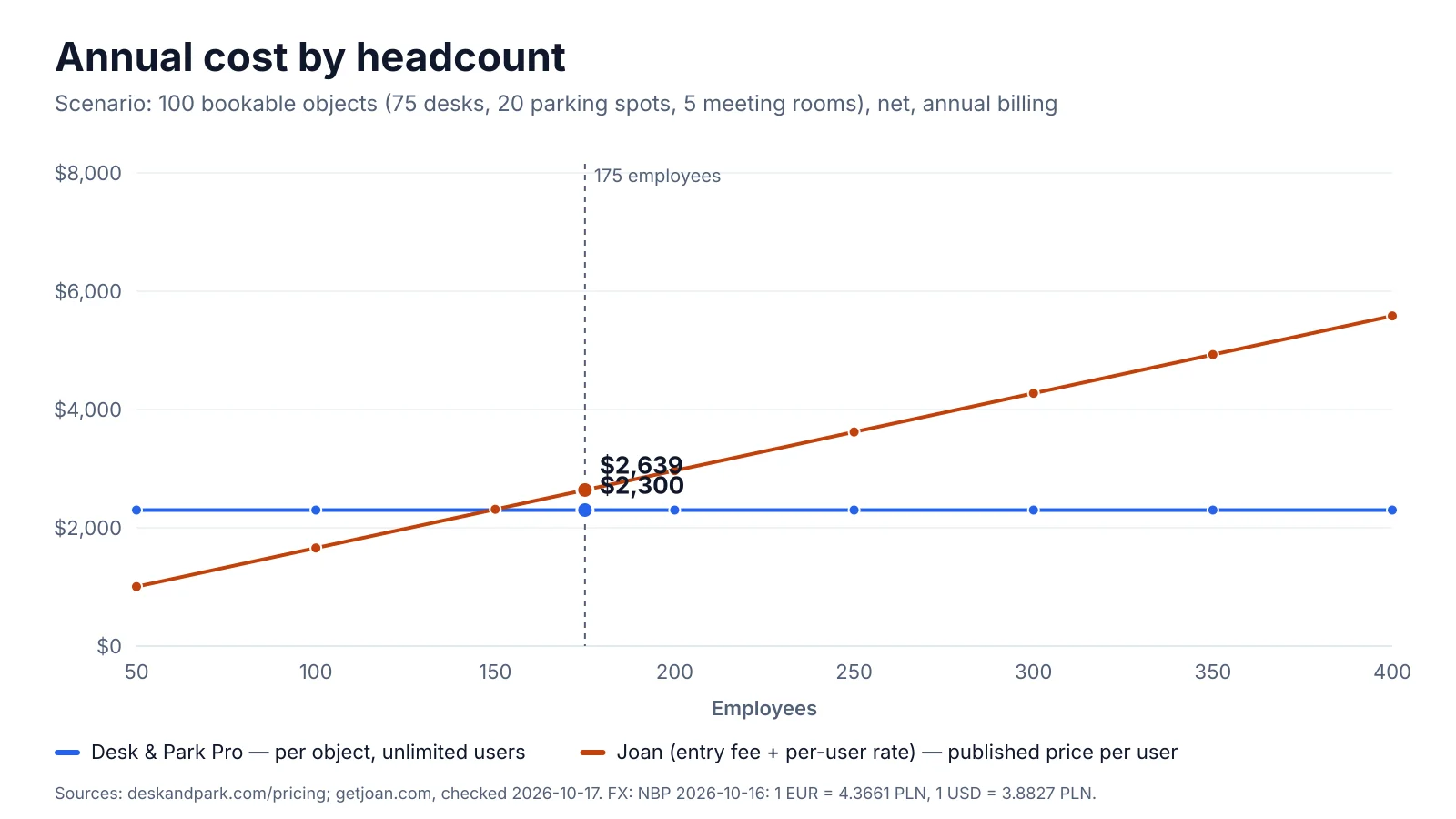
Annual software cost for 50–400 people. Joan: the published floor, a $51 monthly entry fee with 20 users included plus $1.09 per additional user per month (annual billing), $2,639.40 at 175 people; device licences and hardware excluded. Desk & Park: Pro plan, 2,300 USD per year for up to 125 objects, unlimited users.
Pricing and total cost of ownership
How Joan prices. Per getjoan.com/pricing (checked 17 October 2026), plans start at $51 per month; additional users cost $1.09 and additional device licences $10.99 per month on annual billing. A user is someone with a Joan account who logs in to the web or mobile app; employees who only book rooms through Outlook or Google Calendar are not billed. A device is any registered screen or tablet. Every package includes every feature. Joan's detailed plan page (getjoan.com/pricing-detailed, in EUR) lists the quotas: Team, 20 users and 2 device licences included (up to 50 users); Business, 50 users and 5 devices (up to 150); Organization, 100 users and 10 devices (up to 400, sold through a demo). Hardware is a one-off purchase; the software has a 30-day free trial.
How Desk & Park prices. Per bookable object (desk, parking spot including EV, meeting room), users unlimited. Start: free, 10 objects. Standard: 75 objects, 128 USD per month (1,280 per year). Pro: 125 objects, 10 locations, 230 USD per month (2,300 per year). Enterprise: custom. No floor-plan fees, no implementation project; the room tablet kiosk needs no licence, but you supply the tablets.
The scenario: 175 employees, 75 desks, 20 parking spots (4 with EV chargers) and 5 meeting rooms, or 100 bookable objects. All 175 people book desks or parking in the app, so for Joan all of them are users.
| Cost item (annual billing) | Desk & Park | Joan (published floor) |
|---|---|---|
| Subscription base | Pro: 2,300 USD per year | $51 × 12 = $612 (20 users included) |
| Additional users | 0 (unlimited) | 155 × $1.09 × 12 = $2,027.40 |
| Software per year | 2,300 USD | $2,639.40 |
| 5 room displays: licences | Included (your own tablets) | 2 included + 3 × $10.99 × 12 = $395.64 |
| 5 room displays: hardware | Tablets of your choice, not counted | 5 × Joan 6 RE × $399 = $1,995 one-off, excl. tax |
Joan's software floor is $339.40 or 14.8 % above Desk & Park Pro; put the other way, Desk & Park is 12.9 % cheaper. It is a floor, not a quote: 175 users exceed the Team and Business quotas, so the fitting tier is Organization, sold through a demo. With licences for five displays Joan reaches $3,035.04 per year, 32.0 % more, plus $1,995 of hardware in year one. Both vendors publish USD prices, so this version needs no currency conversion.
The chart draws this floor (the $51 entry fee with 20 users, plus $1.09 per additional user; device licences and hardware excluded): $2,639.40 at 175 people, crossing Desk & Park Pro at about 150 app users. The floor is generous to Joan, whose detailed page lists Business (50 to 150 users) at €219 per month. Growth is where the models diverge: at 250 people and the same desks, Joan's floor is $612 + 230 × $1.09 × 12 = $3,620.40, 57.4 % above Desk & Park, which stays at 2,300 USD for 100 objects.
The reverse case is real too: up to 20 app users pay $612 per year on Joan's Team package, and 50 users $1,004.40 ($51 + 30 × $1.09 per month). An office where most people book rooms in Outlook pays only for those who log in.
Architecture and security
Desk & Park. Each customer organisation has its own PostgreSQL database: no tables shared with other customers, backups and erasure per organisation, and an incident in one database does not touch another. Databases run in Frankfurt, the application in the Netherlands; backups are encrypted nightly and an audit log records who did what. Users sign in with TOTP, a passkey or an e-mail code; SSO via OpenID Connect (Entra ID, Google Workspace, Okta) and SCIM work on every plan, including the free one. The honest gaps: no SAML, and ISO 27001 and SOC 2 are planned, not certified. A DPA and data export and deletion requests cover GDPR.
Joan. Per getjoan.com/security (checked October 2026), Visionect d.o.o. holds ISO/IEC 27001:2022 certification. Data is hosted on Google Cloud in Belgium and, per Joan, never leaves the EU; it is encrypted in transit (TLS 1.3) and at rest. SSO works via OAuth2, Google and Microsoft 365, with SCIMv2 and role-based access. The cloud is TX-RAMP Level 1 certified; Joan's FAQ says it holds no SOC certification. Joan does not publish its tenancy model; if isolation matters, ask in writing.
On certification Joan is ahead today: its ISO 27001 certificate can go straight into a procurement file, while Desk & Park's is on the roadmap. Both keep data in the EU. Desk & Park's distinctive answers are the database per organisation and SSO with SCIM on every plan, features 09 and 10 of the Top 10 Desk & Park features.
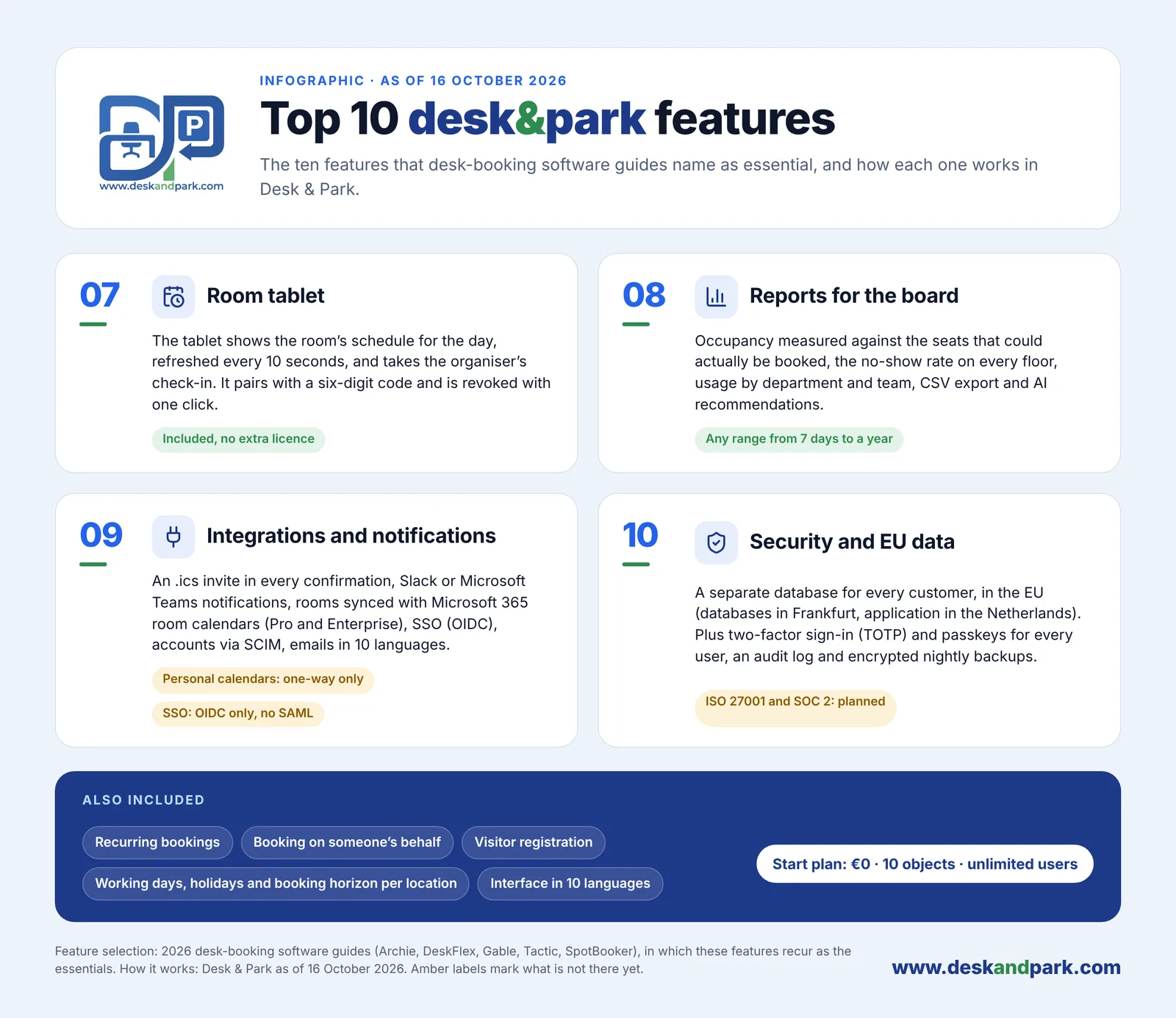
Features 07–10 of the Top 10: the room tablet, Board Reports, integrations, and security with EU data, plus what every plan includes.
Employee experience and team coordination
Desk & Park runs in any browser and installs as a web app, nothing from a store; an Android app adds a native QR scanner, biometric unlock and push notifications, and iOS follows in 2027. Employees pick a spot on the floor plan, colour-coded by availability; parking has its own maps with EV spots marked ⚡, and a desk plus parking spot arrive as one calendar invitation. "Who's in the office" (feature 04) shows booked colleagues' photos in team colours, with a green dot after check-in; the company can switch it off and anyone can hide themselves. Board members hand permanent spaces back for the day with "I'm away today" (feature 06). Recurring and guest bookings are included, and the app speaks 10 languages.
Joan offers iOS and Android apps plus a web app, with map booking, desks, parking and assets, colleagues' presence and permanently assigned desks. Per its help centre, desk check-in works by QR code or NFC tag, geolocation within 200 metres, desk sensors or a notification, with automatic release. Joan also includes full visitor management (pre-registration, NDA signing, badges), digital signage and an AI agent that books from Microsoft Teams. Desk & Park's visitor page is simpler: it registers expected guests.
At the meeting-room door
This is Joan's strongest card. The Joan 6 RE is a 6-inch e-paper touch display that mounts with a magnet, needs no cables and runs up to three months per charge, per its shop page. People book on the display ("Meet now"), check in, extend or end a meeting at the door, and a room nobody checks in to is released. The Joan 6 Pro adds a PoE wall mount for wired rooms. Joan also runs on other screens, each with a device licence.
Desk & Park's room tablet (feature 07) is a web page: any tablet with a current browser pairs with a one-time six-digit code and then shows that room's day, refreshed every 10 seconds, and takes the organiser's check-in. It is included on every plan without a licence and revoked with one click. It deliberately does not take bookings, since a wall tablet does not know who is in front of it, and it needs power and Wi-Fi. If cable-free displays with months of battery are a requirement, Joan wins outright; if you already have tablets or want no per-device fee, the kiosk does the job. More in meeting-room kiosk tablets.
Space optimisation and AI
The most expensive desk is the one booked and never used. In Desk & Park every space has a QR sticker (feature 02): scanning a free desk books it and checks you in; a desk or parking booking not checked in by the deadline, say 10:00, returns to the pool. Meeting rooms are released only if the organisation turns that on (off by default, after 5 to 120 minutes without a check-in); scanning a free room books the next half hour. See ghost bookings and auto-release.
Board Reports (feature 08) measure occupancy against bookable seats, the no-show rate per floor and resource, usage by team, EV demand and the peak day, for 7 days to a year, with CSV export. "Generate report" sends aggregates only, no names, to a large language model, which returns three to six recommendations (cost saving, consolidation, EV, ghost bookings, ESG, capacity planning) with a model-written impact estimate; the board dismisses them or marks them done, audited. It is not forecasting, and Desk & Park does not calculate savings; the estimate is a hypothesis to verify.
Joan's analytics, per its pricing page, cover office occupancy, attendance, no-show bookings, room occupancy, planned versus ad-hoc meetings and time saved per room, with export: a broad set for a rooms-first team.
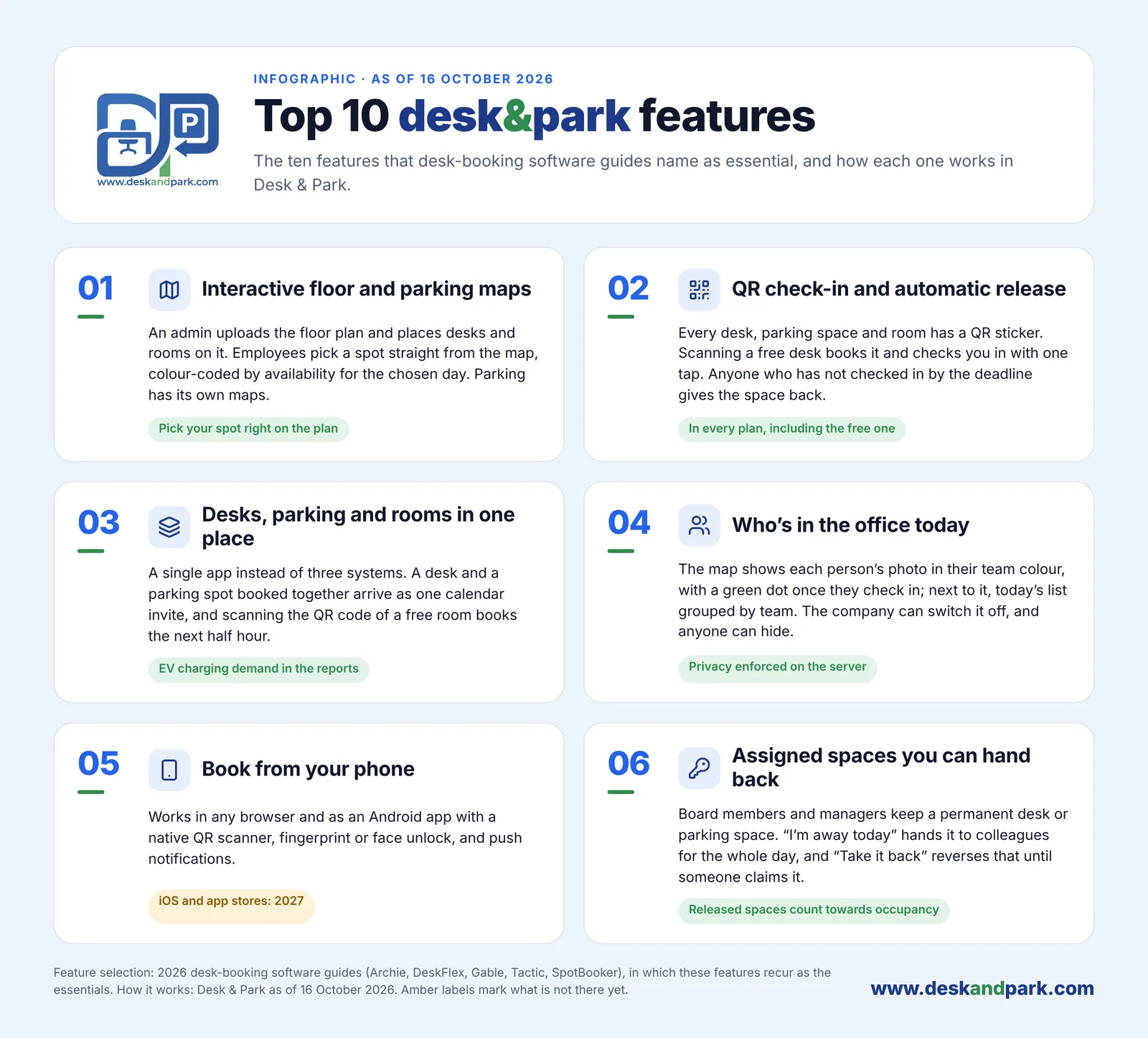
Features 01–06 of the Top 10: maps, QR check-in with automatic release, desks, parking and rooms in one place, who's in the office, booking from the phone, and assigned spaces you can hand back.
Side by side
| Desk & Park | Joan | |
|---|---|---|
| Pricing unit | Per bookable object; users unlimited | Per user and per device licence, in packages |
| Entry price | Start: 0 USD, up to 10 objects | From $51 per month (20 users, 2 device licences) |
| Software, 175 people / 100 objects | Pro: 2,300 USD per year | From $2,639.40 per year (floor) |
| One-off fees | None; 60–90 minutes for one office | None published for software; Joan 6 RE $399 each, excl. tax |
| Data isolation | One PostgreSQL database per organisation | Not published |
| Hosting | EU: Frankfurt and the Netherlands | EU: Google Cloud, Belgium |
| Certifications | ISO 27001 and SOC 2 planned | ISO/IEC 27001:2022; TX-RAMP Level 1 |
| SSO and provisioning | OIDC SSO and SCIM on every plan; no SAML | OAuth2, Google, Microsoft 365 SSO; SCIMv2 |
| Mobile apps | Browser/PWA, Android; iOS in 2027 | iOS, Android, web |
| Parking and EV | Parking maps, EV spots ⚡, EV demand in reports | Parking and asset reservation |
| Check-in and auto-release | QR sticker; desks and parking released after the deadline | QR/NFC, geolocation, sensors; auto-release |
| Room display | Any tablet, no licence; no booking on it | Own wireless e-paper displays; booking at the door; licence per device |
| Visitors | Guest bookings, basic visitor register | Full visitor management |
| Reports and AI | Board Reports, AI recommendations from aggregates | Desk, room and visitor analytics; Teams AI agent |
| Languages | 10 | Multi-language |
Competitor facts from getjoan.com, checked October 2026; prices and features change — check the current page.
Verdict: which one fits
Joan is the better fit when meeting rooms come first and you want dedicated hardware at every door: wireless e-paper displays that last months per charge and take bookings on the spot. It also suits buyers who want visitor management and digital signage in one contract, need an ISO 27001-certified vendor or a native iOS app today, or run a small team (the entry package covers 20 users). It also fits offices where most people book rooms in Outlook, since they are not billed.
Desk & Park is the better fit when the daily friction is desks and the car park rather than rooms, when more than about 150 people will use the app, or when headcount grows while the floor stays the same. It suits companies that want parking with EV chargers on their own maps, a browser-first tool, SSO and SCIM even on the free plan, a database per organisation, and Board Reports with AI recommendations.
The quickest test is your own office: the Start plan is free for up to 10 objects and the onboarding guide takes one office live in 60–90 minutes. See also the Top 10 Desk & Park features, desk booking and parking booking.
FAQ
Is Desk & Park cheaper than Joan?
For 175 people and 100 bookable objects, yes: Desk & Park Pro costs 2,300 USD per year, Joan's published floor $2,639.40 ($51 per month plus 155 users at $1.09, annual billing), 14.8 % more before displays. Small teams can be cheaper on Joan: up to 20 app users pay $612 per year, 50 users about $1,004.
Does Desk & Park have room displays like Joan's?
It has a room tablet kiosk that runs in any tablet's browser, shows the room's day refreshed every 10 seconds and takes check-ins, on every plan without a licence. It does not take bookings and needs power. Joan's own Joan 6 RE is wireless, lasts up to three months per charge and costs $399 excluding tax plus a device licence, so for cable-free hardware Joan is stronger.
Which one is certified for security?
Joan's company, Visionect d.o.o., holds ISO/IEC 27001:2022 certification and hosts data on Google Cloud in Belgium, per getjoan.com in October 2026. Desk & Park hosts in the EU with one PostgreSQL database per organisation; ISO 27001 and SOC 2 are planned, not yet certified.
Can we move from Joan to Desk & Park?
Yes. Users are imported from a CSV and sign in with an e-mail code or OpenID Connect SSO, with SCIM on every plan. Spaces are placed on an uploaded floor plan and QR stickers printed per location, in 60–90 minutes for one office. Bookings are not migrated, so switching on a Monday is practical.
#DeskAndPark#Comparison#Joan#RoomDisplays#Pricing#DeskBooking#HybridOffice
Ask AI about this article
Get a summary or a second opinion: each button opens the assistant with a question about this article.