- comparison
- microsoft places
- microsoft 365
- desk booking
- parking management
- hybrid office
Desk & Park vs Microsoft Places: desks, parking and TCO
Microsoft Places now licenses desks per space at about $2 a month. What it covers, what it leaves out (parking, QR check-in) and the TCO for 100 objects.
Microsoft Places is the hybrid-work layer of Microsoft 365: work plans, room and desk-pool booking and "who is in the office" live inside Outlook and Teams, and since 1 April 2026 individual desks are licensed per space, at 8 USD per paid licence per month plus three desks free, about 2 USD per desk (per learn.microsoft.com, October 2026). Desk & Park is a stand-alone app for desks, parking spots, EV chargers and meeting rooms on one map, priced per bookable object with unlimited users: 2,300 USD a year for up to 125 objects. For 75 desks and 5 rooms Places costs less (1,920 USD a year); the difference lies in what each covers, above all parking, QR check-in and the setup work before the first booking.
The hybrid week looks the same in most offices in 2026: from Tuesday to Thursday desks run short and the car park fills early, on Monday and Friday half the floor is empty. Places starts from the Microsoft 365 calendar and adds spaces to it; Desk & Park starts from the floor plan and the car park and sends invitations to the calendar.
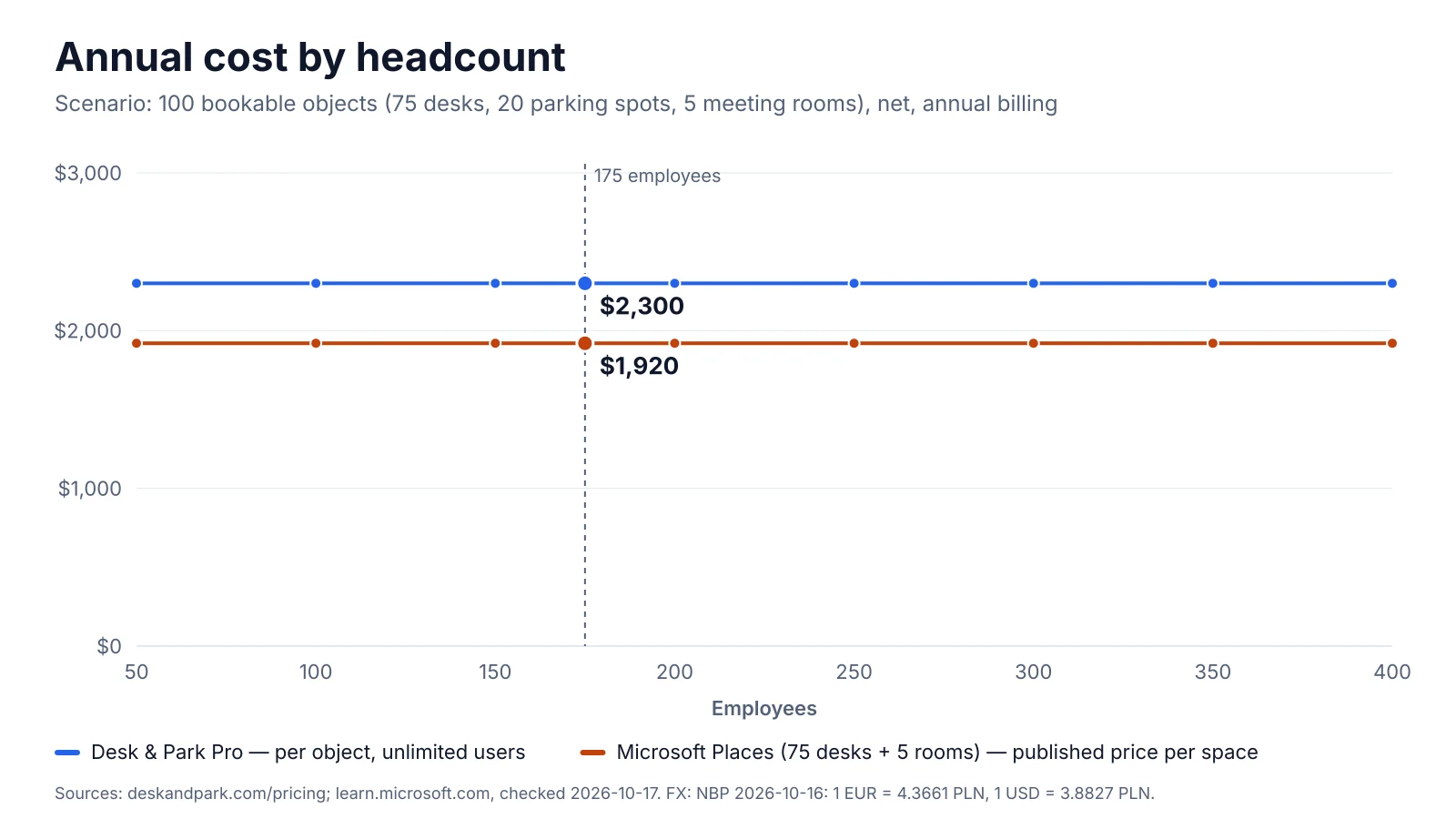
Per year: Desk & Park Pro, 2,300 USD for all 100 objects, parking included. Microsoft Places: the 75 desks + 5 rooms it can license, 80 × about 2 USD × 12 = 1,920 USD; parking not covered (no parking type); Microsoft 365 licences excluded.
Pricing and TCO: 175 people, 100 objects
The scenario used in every comparison on this blog: 175 employees, 75 desks, 20 parking spots (4 with EV chargers) and 5 meeting rooms, 100 bookable objects in total.
Desk & Park. 100 objects fit the Pro plan (up to 125 objects, 10 locations): 2,300 USD net per year with annual billing, or 230 USD per month. Users are unlimited, and there is no fee for uploading floor plans.
Microsoft Places has two cost layers, per Microsoft's licence pages checked in October 2026:
- Users. Every user needs a supported Microsoft 365 or Teams plan (Business Basic, Standard or Premium, E1/E3/E5, F1/F3, A1/A3/A5, Teams Enterprise, Essentials or standalone). A company already on Microsoft 365 pays nothing extra, and the "core" features come with it: work plans, workplace presence, booking rooms and desk pools, Places finder and explorer, desk assignment, the management portal and basic analytics.
- Spaces. Booking an individual desk, auto-release and occupancy reports need a space licence on each desk or room. A paid Microsoft Teams Shared Space licence is listed at 8 USD per month, excluding taxes, and entitles you to three free Single Space licences, so one paid licence covers four desks: an effective 2 USD per desk per month.
| Item | Microsoft Places | Desk & Park |
|---|---|---|
| 175 users | Microsoft 365 licences already paid (not counted) | Unlimited users, included |
| 75 desks + 5 rooms with booking, auto-release, reports | 80 spaces ÷ 4 = 20 paid licences × 8 USD × 12 = 1,920 USD | Included in Pro |
| 20 parking spots, 4 with EV chargers | No parking type in the Places directory | Included in Pro |
| Floor plans | IMDF files; Microsoft recommends conversion partners and publishes no fee for them | Upload an image, no fee |
| Total per year | 1,920 USD for desks and rooms | 2,300 USD for all 100 objects |
For desks and rooms alone, Microsoft Places is 380 USD a year cheaper; Desk & Park costs 19.8 % more and also covers the 20 parking spots and EV chargers. If you represented parking spots as desks in Places, a workaround Microsoft's documentation does not describe, 100 spaces would need 25 paid licences: 2,400 USD a year, 100 USD (4.2 %) more than Desk & Park. And with desk pools and rooms only, without individual desks, auto-release or occupancy reports, Places costs nothing beyond Microsoft 365.
Growth from 175 to 250 people changes neither price, because both are now per space (provided new staff get Microsoft 365 licences anyway). Customers with an active Teams Premium subscription keep the former premium features until renewal.
Setup effort: PowerShell and IMDF vs six self-serve steps
Microsoft Places is set up by an administrator with the Places Administrator or Exchange Administrator role. The directory is a strict hierarchy (building, floor, section, then rooms, desk pools and desks), managed in the Places management portal or with PowerShell; every bookable desk gets its own mailbox. Floor plans are optional, but they must be georeferenced IMDF files, one building per package, uploaded only via PowerShell; Microsoft recommends specialised partners because "creating and correlating IMDF files can be complex". Licences are assigned desk by desk, and Microsoft notes that reseller orders can take several weeks.
Desk & Park is set up by one administrator in six self-serve steps: company account with an e-mail code, upload a plan image, place the spaces, print the QR stickers, invite users from a CSV, first booking. The onboarding guide quotes 60–90 minutes for one office.
Architecture and security
Microsoft Places inherits Microsoft 365. Its privacy page says Places data stays within the customer's tenant, follows the standard Microsoft 365 storage rules by geography under Microsoft's Data Protection Addendum, and follows the Microsoft EU Data Boundary; roles, identity and app management are those of Microsoft 365. If your security review has already approved Microsoft 365, that is a real advantage: no new vendor, contract or identity provider. Places requires mailboxes in Exchange Online, not on-premises.
Desk & Park is a separate vendor, so it has to pass the review on its own:
- One PostgreSQL database per customer organisation. No tables shared with other customers; backups and erasure per organisation; an incident in one database does not touch another.
- EU hosting: databases in Frankfurt, the application in the Netherlands. Encrypted nightly backups and an audit log of who did what.
- Sign-in: two-factor (TOTP) and passkeys for every user, one-time e-mail codes, SSO through OpenID Connect, which works with Microsoft Entra ID, and SCIM provisioning and deprovisioning from Entra ID or Okta, on every plan, the free one included.
- The honest gaps: no SAML (OIDC only), and ISO 27001 and SOC 2 are planned, not certified. GDPR: EU hosting, data export and deletion requests in the settings, and a data processing agreement.
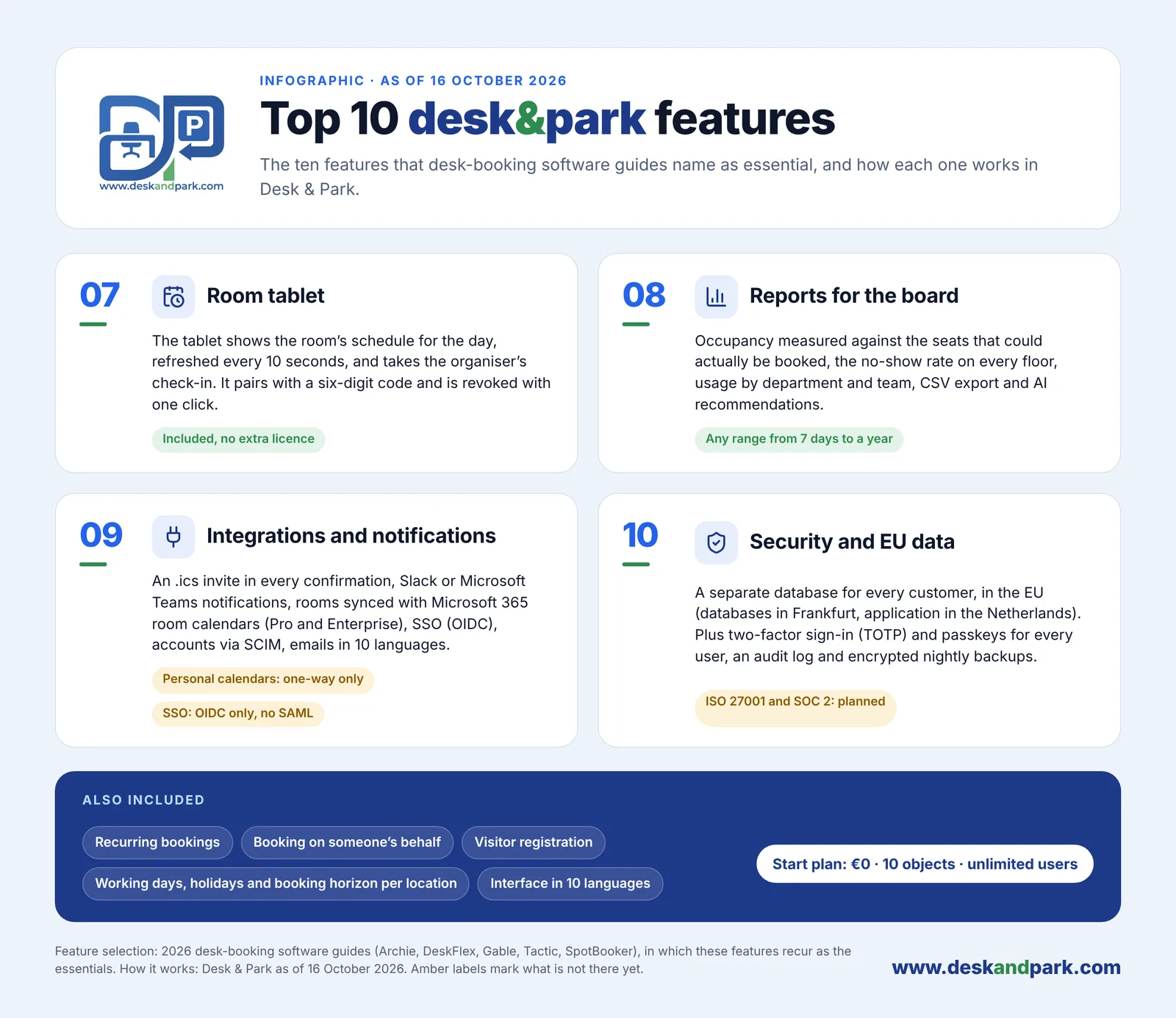
Features 07–10 of the Top 10 Desk & Park features: room tablet, Board Reports, integrations, security and EU data, plus what every plan includes.
Employee experience and team coordination
This is where Microsoft Places is strongest. Work plans, workplace presence, in-person events with hybrid RSVP and the Places card sit inside the Outlook and Teams calendars employees already use all day. The Places app runs on the web and, on desktop and mobile, as a connected app inside Outlook, Teams and the Microsoft 365 app. Nobody installs anything new.
Desk & Park is a dedicated app focused on the physical spot:
- Booking on the map. Employees pick a desk or parking spot on the floor plan, colour-coded by availability for the chosen day (feature 01 of the Top 10). The web app runs in any browser and installs as a PWA; an Android app adds a native QR scanner, fingerprint or face unlock and push notifications. An iOS app is planned for 2027.
- Parking as a first-class object. Parking has its own maps (several areas per location, such as garage and lot), EV charger spots are marked ⚡, and a desk booked with a parking spot arrives as one calendar invitation. See parking booking.
- Who's in the office. The map shows each booked colleague's photo or initials in their team colour, a green dot after check-in, and a roster grouped by team. The company can switch it off and anyone can hide themselves.
- Assigned spaces you can hand back. Board members (and managers on Enterprise) keep a permanent desk or parking spot; "I'm away today" releases it to colleagues for the day and "Take back" reverses it. In Places, per Microsoft's documentation, an assigned desk is linked to one user and cannot be booked by others.
- Guests and assistants. Booking on someone's behalf, and guest bookings without user accounts.
Desk & Park also talks to Microsoft 365: every confirmation carries a calendar invitation, bookings can be posted to Microsoft Teams or Slack, and on Pro and Enterprise meeting rooms sync both ways with Microsoft 365 room calendars. It does not book desks from inside Outlook; desks and parking are booked in Desk & Park.
Space optimisation and AI
Ghost bookings make an office look full on paper. Both products answer with check-in and auto-release.
Microsoft Places documents these desk check-in methods: plugging a laptop into a linked desk peripheral such as a monitor or dock, confirming from an e-mail reminder sent 15 minutes before release, and, marked "coming soon", checking in to the building. The default release window is 10 minutes and can be extended; changes to auto-release settings can take up to 48 hours to apply. Places analytics visualises intended and actual occupancy for buildings, rooms and desk pools; auto-release and occupancy reports for desks and rooms need the space licence. Copilot room booking requires a Microsoft Copilot licence.
Desk & Park puts a printed QR sticker on every desk, parking spot and room (feature 02). Scanning a free desk books it and checks you in with one tap; a desk or parking booking not checked in by the organisation's deadline, for example 10:00, is released automatically. Meeting rooms are released only if the organisation turns that on (off by default, after 5 to 120 minutes without a check-in); scanning a free room books the next half hour. No peripherals or extra licences, and it works in the car park too.
Board Reports measure occupancy against the seats that could actually be booked, the ghost-booking rate per floor and resource, usage by department and team, EV charging demand and the peak day, for any range from 7 days to a year, with CSV export. AI recommendations: an administrator clicks "Generate report", a large language model receives aggregates only (no employee names) and returns 3–6 recommendations, such as space consolidation, EV optimisation or a ghost-booking alert, each with a model-written impact estimate that the board dismisses or marks as done. It is not predictive forecasting and Desk & Park does not calculate savings; the estimate is a hypothesis to verify.
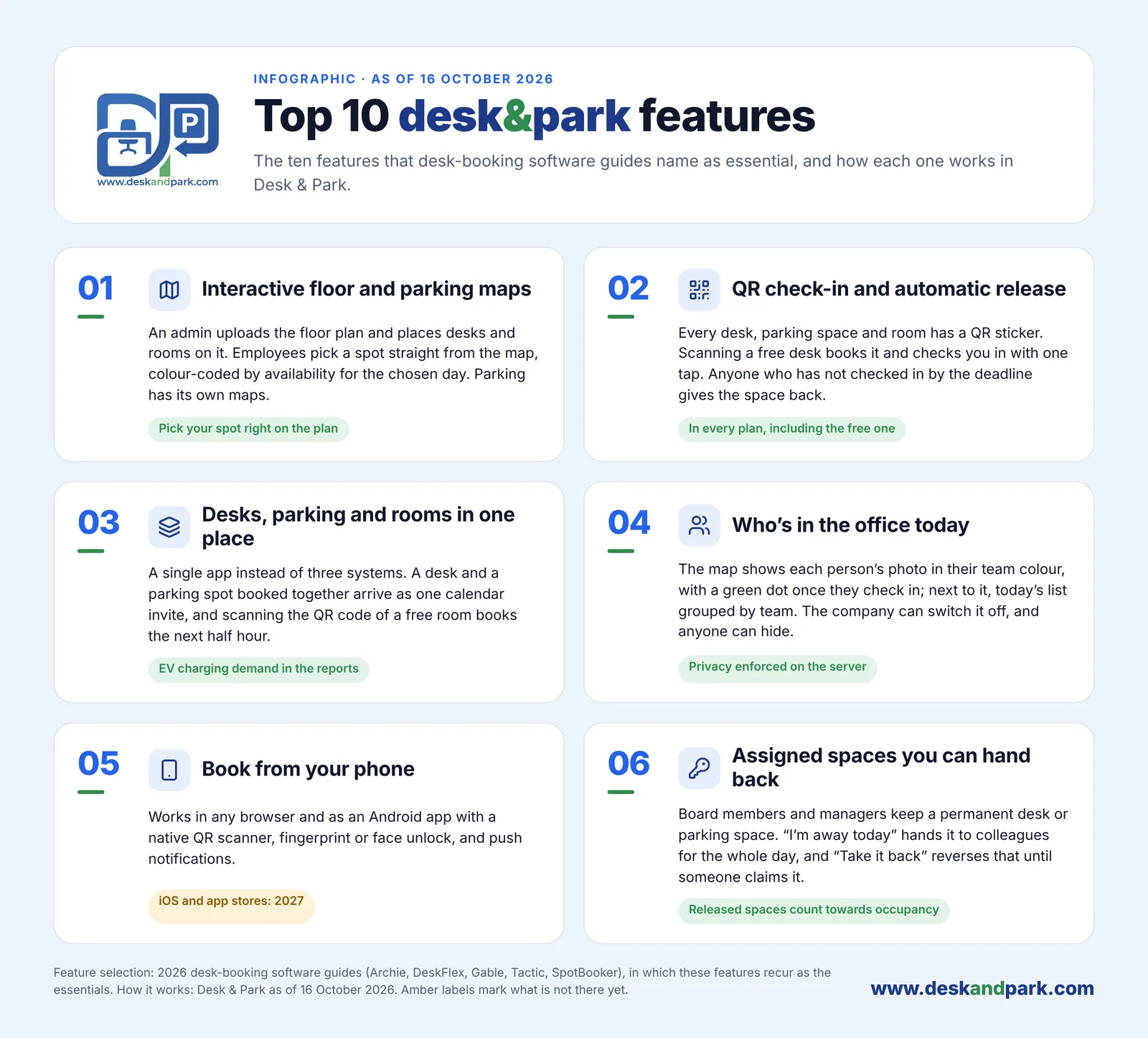
Features 01–06 of the Top 10: interactive maps, QR check-in and auto-release, desks, parking and rooms in one place, who's in the office, booking from the phone, assigned spaces you can hand back.
Side by side
| Desk & Park | Microsoft Places | |
|---|---|---|
| Pricing unit | Per bookable object; unlimited users | Microsoft 365 user plan, plus a space licence per individual desk or room for premium features |
| Entry price | Start: 0 USD, up to 10 objects, 1 location | Core features included in supported Microsoft 365 and Teams plans |
| Scenario (100 objects, 175 people) | Pro: 2,300 USD per year, all 100 objects | 1,920 USD per year for 75 desks + 5 rooms; parking not covered |
| Setup and one-off fees | Self-serve, 60–90 minutes for one office; no plan-upload fee | Admin role, PowerShell, a mailbox per desk; IMDF floor plans via partners (fees not published by Microsoft) |
| Data isolation | One PostgreSQL database per organisation | Data within the customer's Microsoft 365 tenant |
| Hosting region | EU: Frankfurt (data), Netherlands (app) | Microsoft 365 storage by geography; EU Data Boundary |
| SSO / SCIM | OIDC (incl. Entra ID) and SCIM on every plan; no SAML | Microsoft 365 and Entra ID identity |
| Apps | Web/PWA and Android; iOS in 2027 | Web; inside Outlook, Teams and the Microsoft 365 app on desktop and mobile |
| Parking and EV chargers | Own parking maps, EV spots, one invite with the desk | No parking type in the Places directory |
| Check-in and auto-release | QR sticker scan; automatic release by a set deadline | Desk peripheral or e-mail; building check-in coming soon; space licence needed |
| Room tablet | Kiosk view included, paired with a 6-digit code | Not covered by the Places pages checked |
| Reports and AI | Board Reports, CSV, AI recommendations from aggregates | Places analytics (occupancy reports need a space licence); Copilot room booking with a Copilot licence |
| Calendar | Invite with every booking; room sync with Microsoft 365 (Pro and Enterprise) | Native in Outlook and Teams calendars |
| Interface languages | 10 | Not checked for this article |
Competitor facts from learn.microsoft.com, checked October 2026; prices and features change, so check the current page.
Verdict
Microsoft Places is the better fit when the company already runs on Microsoft 365, the main need is coordination (who comes in when, rooms, desk pools) rather than individual spots, and IT prefers no new vendor. With desk pools and rooms it costs nothing extra; with individual desks about 2 USD per desk per month, hard to beat at scale. Its place inside Outlook and Teams is something no stand-alone tool can match.
Desk & Park is the better fit when the car park is part of the problem (parking spots, EV chargers, executive spaces handed back for the day), when you want QR check-in without peripherals, when an office manager should finish the setup in an afternoon, and when the security review asks for EU hosting and a separate database per customer. The two can coexist: rooms stay in Exchange and sync both ways, people sign in with Entra ID, and Desk & Park runs desks and parking. See pricing, onboarding and the guide to corporate parking management.
FAQ
Is Microsoft Places free with Microsoft 365?
Its core features are: users with a supported plan such as Business Basic or E3 can set work plans, book rooms and desk pools and use Places finder at no extra cost. Since 1 April 2026, booking individual desks, auto-release and occupancy reports need a space licence: 8 USD per paid licence per month with three more desks free, about 2 USD per desk, per Microsoft's documentation in October 2026.
What does each cost for 75 desks, 20 parking spots and 5 meeting rooms?
Desk & Park Pro covers all 100 objects for 2,300 USD a year with unlimited users. Microsoft Places needs 20 paid Shared Space licences for the 75 desks and 5 rooms, 1,920 USD a year, on top of existing Microsoft 365 licences; it has no parking type, so the 20 parking spots are not covered.
Can Microsoft Places manage parking?
The Places directory knows buildings, floors, sections, rooms, workspaces (desk pools) and desks; parking is not among the documented types as of October 2026. Desk & Park has separate parking maps, EV charger spots marked ⚡ and EV demand in its reports.
Can Desk & Park work alongside Microsoft 365?
Yes. People sign in through Entra ID with OpenID Connect, SCIM provisions and removes users, every booking arrives as a calendar invitation, notifications can go to Microsoft Teams, and on Pro and Enterprise meeting rooms sync both ways with Microsoft 365 room calendars.
How long does setup take?
Desk & Park's onboarding guide quotes 60–90 minutes for one office in six self-serve steps, starting from a plan image. Microsoft Places needs an administrator role and PowerShell for floor plans in georeferenced IMDF format, for which Microsoft recommends partners.
#DeskAndPark#Comparison#MicrosoftPlaces#Microsoft365#DeskBooking#ParkingManagement#HybridOffice
Ask AI about this article
Get a summary or a second opinion: each button opens the assistant with a question about this article.