- comparison
- whirla
- pricing
- desk booking
- parking booking
- hybrid office
Desk & Park vs Whirla: published plans vs a guided rollout
Whirla starts at €249 a month with a guided rollout and ISO 27001; Desk & Park is a flat, self-serve plan. TCO, security and parking for 100 spaces.
Whirla and Desk & Park both book desks, parking spots and meeting rooms in offices you already have, and both are built for hybrid work. Whirla, based in Warsaw, sells a modular smart-office platform with a guided implementation and lists a starting price of €249 per month (whirla.pl, English page, checked 13 November 2026); the Polish version of the same page says from 799 PLN per month. Neither page says how many desks, locations or modules that entry price covers. Desk & Park publishes flat plans by the number of objects: 100 desks, parking spots and rooms fit the Pro plan at 2,300 USD a year, with parking, EV charger spots and unlimited users included.
Hybrid work in 2026 follows a pattern most workplace teams recognise: Tuesday to Thursday the office is full and people circle the car park, Monday and Friday whole rows of desks stay empty.
Whirla answers this with modules you combine: desk booking, meeting rooms, parking, dynamic workspace allocation, hybrid work statuses, virtual reception, a fire warden module and a conference centre for multi-tenant buildings, plus custom modules built to order, room displays, visitor tablets and sensors. Its home page names Colliers, Schenker, Electrolux, Macmillan, Servier, Q22 and Senator / Orlen as implementations. Desk & Park is one self-serve app for desks, parking and rooms, with a free plan and published prices. This comparison covers where the two overlap and says plainly where Whirla's extra modules are the reason to choose it.
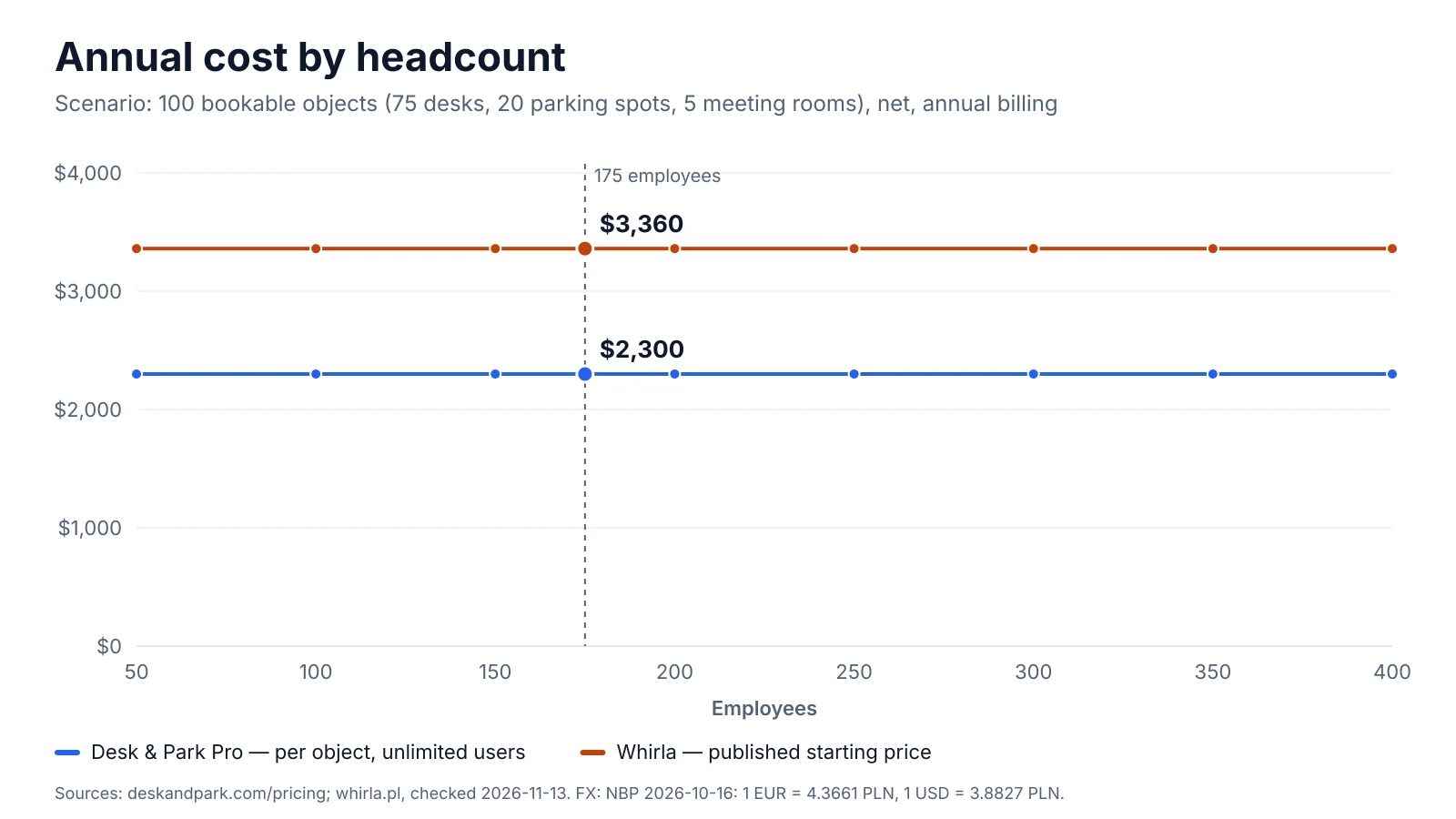
Neither price moves with headcount. Whirla's line is its published entry price, whose scope is not stated, converted from euros; Desk & Park's is the Pro plan on annual billing. Whirla figure: whirla.pl, November 2026.
Pricing and total cost of ownership
Take a typical mid-sized hybrid office: 175 employees, 75 desks, 20 parking spots (4 of them with EV chargers) and 5 meeting rooms — 100 bookable objects in total.
Whirla. The site publishes one number: "Starting from €249 per month" on the English home page, "Już od 799 PLN miesięcznie" (from 799 PLN a month) on the Polish one. It does not say what the entry price includes — how many desks or parking spots, which modules, whether the implementation is part of it — whether it is billed monthly or annually, or whether tax is added. Taking the English entry price as the cost of the whole scenario, the assumption most favourable to Whirla:
- €249 × 12 = €2,988 per year, about 3,360 USD.
- On the Polish page: 799 PLN × 12 = 9,588 PLN per year, about 2,469 USD. The same entry price is lower in złoty than in euros, so which page you read changes the answer; ask for a quote in your currency.
- Room displays, visitor tablets and sensors are sold as hardware extensions with no published price, and are left out.
Desk & Park. 100 objects fit the Pro plan (up to 125 objects, 10 locations): 2,300 USD per year with annual billing, or 230 USD per month. Users are unlimited, parking and EV spots are objects like any desk, the room tablet needs no extra licence, and there is no fee for floor plans or setup.
| Scenario: 100 bookable objects | Per year |
|---|---|
| Whirla entry price, €249 × 12 (scope not published) | €2,988 ≈ 3,360 USD |
| Whirla entry price, Polish page, 799 PLN × 12 | 9,588 PLN ≈ 2,469 USD |
| Desk & Park Pro, annual billing | 2,300 USD |
| Desk & Park Pro, monthly billing (12 × 230) | 2,760 USD |
Conversion uses the NBP mid rates of 16 October 2026 (table 202/A/NBP/2026): 1 EUR = 4.3661 PLN and 1 USD = 3.8827 PLN, so 1 EUR = 1.1245 USD.
Against Whirla's euro entry price, Desk & Park Pro on annual billing costs 1,060 USD less per year — 31.5 % less — and 600 USD (17.9 %) less on monthly billing. Against the złoty entry price the gap shrinks to 169 USD a year on annual billing, and Desk & Park's monthly billing is the more expensive option. Because Whirla's entry price may not cover 100 objects, parking and rooms, every Whirla figure here is a floor, not a quote.
What the price buys is different. Whirla's entry price sits next to a guided implementation: a prepared office map, configured integrations, roles and access settings, training materials for administrators and employee training, with a start "in just a few days". Desk & Park is self-serve: one administrator sets up an office in 60–90 minutes, and no one from Desk & Park has to be involved.
Architecture, security and data protection
Desk & Park. Every customer organisation gets its own PostgreSQL database: no tables shared with other customers, backups and erasure per organisation, and an incident in one database does not touch another. Databases run in Frankfurt and the application in the Netherlands. Backups are encrypted nightly, and an audit log records who did what. Every user can sign in with two-factor authentication (TOTP), passkeys (WebAuthn) or a one-time e-mail code. Single sign-on uses OpenID Connect (Microsoft Entra ID, Google Workspace, Okta and other OIDC providers) and SCIM provisioning and deprovisioning (Entra ID, Okta) — on every plan, including the free one. The data processing agreement names every subprocessor and where it processes data.
The honest gaps: Desk & Park supports no SAML (OIDC only, SAML planned for 2027), and ISO 27001 and SOC 2 are planned, not certified.
Whirla. Its IT & Compliance page shows an ISO/IEC 27001 certificate badge and says its practices align with that standard. It states that Whirla runs on DigitalOcean, with production separated from development and testing, and that all inbound traffic goes through Cloudflare for TLS 1.2+, a web application firewall, DDoS protection and DNS filtering. Databases and backups are encrypted at rest, administrative access uses strong authentication, operational activity is logged and access is reviewed periodically. SSO uses SAML 2.0 with Microsoft Entra ID, Okta, Google Workspace and other SAML providers, and the desk module describes automatic user and structure sync with directories such as Azure AD. The pages we checked do not state the hosting region, whether customers share a database, or the names of the e-mail and push providers.
On certification and SAML Whirla is ahead today; on a database per customer, a published EU location and SCIM and passkeys on every plan only Desk & Park publishes an answer.
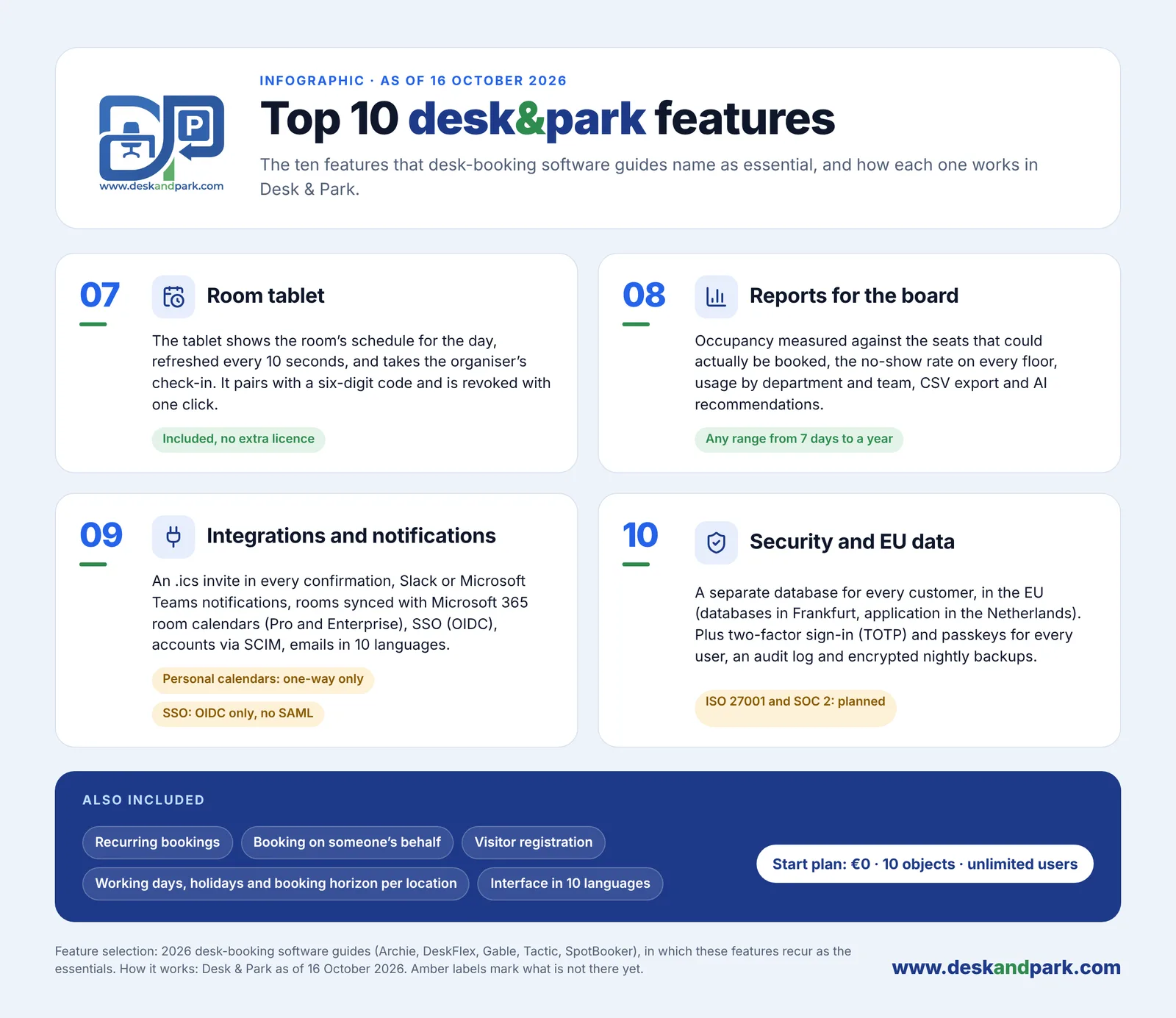
Features 07–10 of the Top 10 Desk & Park features: the room tablet, reports, integrations and EU data protection — included in the plan price, not sold as modules.
Employee experience and team coordination
Desk & Park runs in any browser and installs as a PWA, with nothing to download from a store; an Android app adds a native QR scanner, fingerprint or face unlock and push notifications. The iOS app is planned for 2027. Scanning the QR sticker of a free desk books it and checks you in with one tap.
"Who's in the office" shows each booked person's photo or initials ringed in their team colour, with a green dot once checked in, and today's roster grouped by team. The company can switch it off and anyone can hide themselves, enforced on the server. Recurring "Repeat weekly" bookings set a team's anchor days up to 90 days ahead and skip the location's holidays. Team zones and "seat me next to my team" are planned for 2027. Interface and e-mails come in 10 languages.
Whirla works through a mobile app (store listings exist for Android and iOS) and a web panel. Its desk module lists hourly, full-day, recurring and group bookings, an interactive map with live status across locations, filters by equipment, and a view of which colleagues are in and where they sit. Administrators set booking limits, maximum duration, how far ahead people can book, zone access and day-of-week rules, and can assign desks to people or teams. Check-in works by a button in the app, a QR code at the desk or a QR code in the space, with check-out and automatic release of no-shows.
Two Whirla modules go further than Desk & Park on team coordination today. Hybrid Work Statuses let people mark office or remote days. Dynamic Workspace Allocation turns the process around: employees declare the days they will come in, managers plan team days and recurring events, and an algorithm assigns desks and zones so teams sit together. Desk & Park has no equivalent yet.
Parking, meeting rooms and reception
Parking. Both treat parking as a first-class object. In Desk & Park parking spots and EV charger spots (marked ⚡) are on every plan, with their own maps, QR check-in and automatic release, and a desk and parking spot booked together arrive as one calendar invitation. Whirla's parking module adds things Desk & Park does not have: vehicles and licence plates assigned to users, shared vehicles, priority access for selected groups, a waiting list, optional integration with the building's parking system (its Senator / Orlen implementation) and limited views for security staff. It also marks EV charger spots and other custom attributes.
Meeting rooms. Whirla lists two-way integration with Outlook and Google Calendar, booking from the calendar, room tablets and displays, external guest invitations and filters by capacity and equipment; its compliance page adds Zimbra. Desk & Park syncs room calendars two ways with Microsoft 365 or Google Workspace on Pro and Enterprise (one provider per organisation), sends one-way .ics invitations to personal calendars on every plan, and includes the room tablet in the plan price. Scanning the QR code of a free room books the next half hour.
Reception and beyond. Whirla's Virtual Reception handles visitor invitations, check-in, badges, host notifications and a visitor register; the Fire Warden module assigns roles and checklists; the Conference Centre module runs bookings, room layouts, catering and AV for several companies in one building, with billing across budgets. Desk & Park books spaces for visitors without an account; a reception kiosk is planned for 2027, while catering and occupancy sensors are not planned.
Space optimisation, reports and AI
The quiet cost of hybrid work is the ghost booking: a desk or parking spot reserved and never used. Both tools release unconfirmed bookings automatically. In Desk & Park, a desk or parking booking not checked in by your organisation's deadline (for example "check in by 10:00") returns to the pool; meeting rooms are released only if the organisation turns that on.
Board Reports measure occupancy against the seats that could actually be booked, the no-show (ghost) rate per floor and resource, usage by department and team, EV charging demand and peak day, for any range from 7 days to a year, with CSV export. AI recommendations send a large language model aggregates only (no employee names) and return 3–6 hypotheses — space consolidation, EV optimisation, ghost booking alerts, capacity planning and more — which the board dismisses or marks as done in the audit log. They are not forecasts, and Desk & Park does not calculate savings.
Whirla reports occupancy over time and the use of desks, zones, rooms and parking, with exports to CSV, XLS or XML and access through an API. Sensors under desks are offered as hardware for measuring actual use; the pages we checked do not mention AI features.
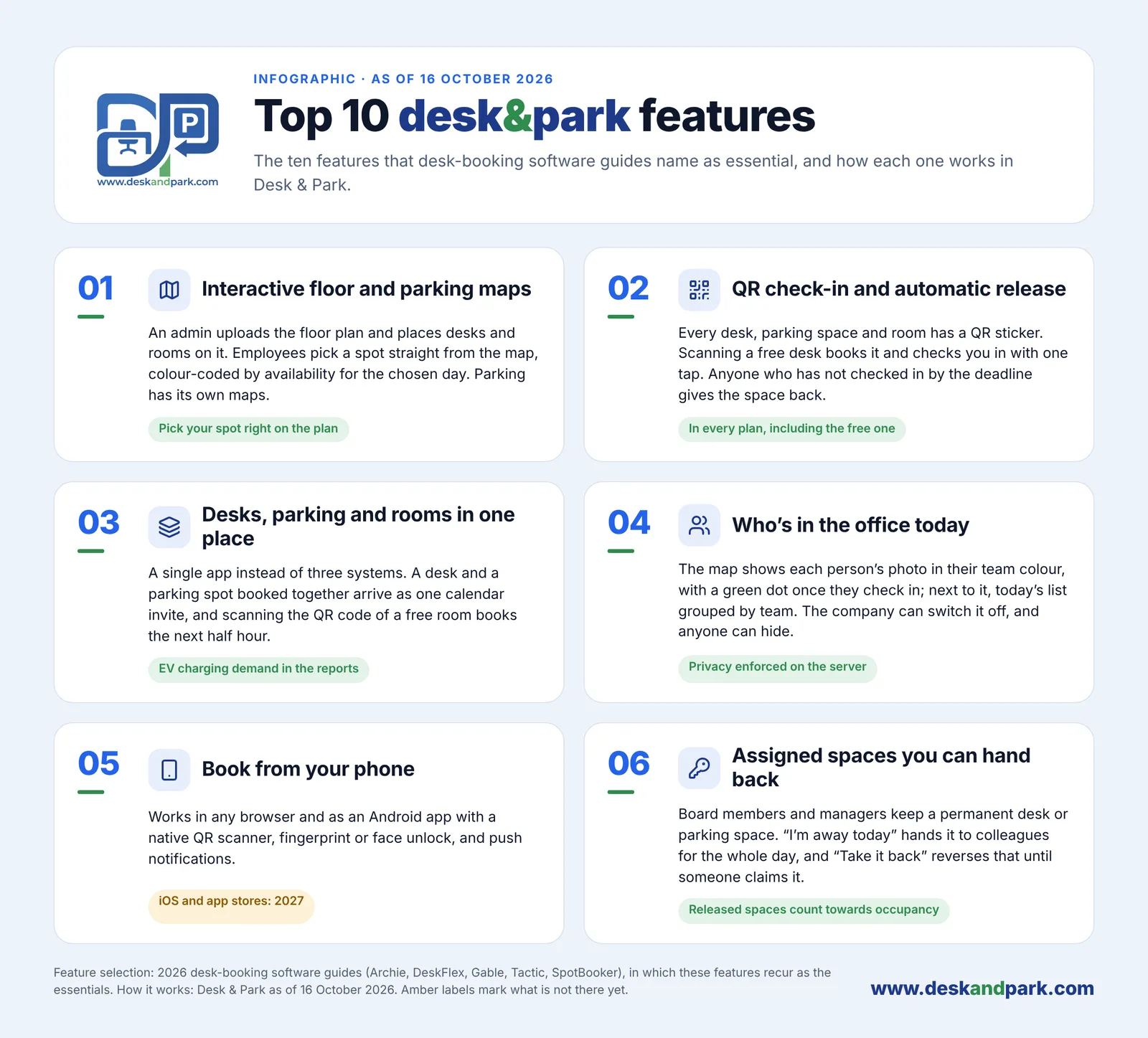
Features 01–06 of the Top 10: the everyday part — map, QR check-in with auto release, desks, parking and rooms in one app, who's in the office, phone booking and assigned spaces you can hand back.
Side-by-side comparison
| Desk & Park | Whirla | |
|---|---|---|
| What it is | Self-serve booking for desks, parking, EV spots and rooms | Modular smart-office platform with guided implementation |
| Pricing unit | Plan by number of bookable objects; unlimited users | Not published |
| Entry price | Start: 0 USD, up to 10 objects, 1 location | From €249 per month (English page); from 799 PLN per month (Polish page) |
| Scenario TCO (100 objects) | 2,300 USD/year (Pro, annual billing) | At least €2,988 (≈ 3,360 USD) a year, if the entry price covers it |
| Setup | Self-serve, 60–90 minutes for one office, no fees | Guided rollout in a few days: map, integrations, roles, training |
| Parking and EV | On every plan; separate maps; EV spots marked ⚡ | Parking module; vehicles and plates, waiting list, parking-system integration, EV attribute |
| Team allocation | "Who's in the office", recurring anchor days; team zones in 2027 | Hybrid work statuses; algorithm-based dynamic allocation around teams |
| Reception and extras | Visitor bookings; kiosk in 2027 | Virtual reception, fire warden, conference centre, custom modules |
| Data isolation | Own PostgreSQL database per organisation | Not published |
| Hosting | EU: Frankfurt (databases), Netherlands (application) | DigitalOcean, behind Cloudflare; region not stated |
| Certifications | ISO 27001 and SOC 2 planned, not certified | ISO/IEC 27001 certificate shown |
| SSO and provisioning | OIDC and SCIM on every plan; passkeys and TOTP for all users; no SAML | SAML 2.0 (Entra ID, Okta, Google Workspace); directory sync |
| Calendars | Room sync with Microsoft 365 or Google (Pro, Enterprise); .ics for personal calendars | Outlook and Google Calendar two-way; Zimbra |
| Mobile | Browser/PWA and Android; iOS in 2027 | Mobile app (Android and iOS listings) and web panel |
| Hardware | Room tablet included; no sensors | Room displays, visitor tablets, desk sensors (price not published) |
| Reports and AI | Board Reports; AI recommendations from aggregates | Occupancy reports; CSV, XLS, XML and API export |
| Languages | Interface and e-mails in 10 languages | Website in Polish and English; app languages not stated |
Whirla facts from whirla.pl (home page in English and Polish, the module pages and IT & Compliance), checked 13 November 2026; prices and features change — check the current page.
Verdict: which one fits your company
Whirla is the better fit if you want a vendor to prepare the map, configure integrations and train your people, and if your security review needs an ISO/IEC 27001 certificate, SAML 2.0 or Zimbra today. It also fits a company that wants the system to seat teams together automatically, needs licence plates, a parking waiting list or integration with the building's barrier system, or wants reception, fire-warden and conference-centre processes from the same vendor — or a module built to order.
Desk & Park is the better fit if you want to see the full price before you talk to anyone (100 objects: 2,300 USD a year), start on a free plan, keep parking and EV spots on the same map as desks on every plan, need your data in the EU in a database of your own, want SCIM and passkeys without an enterprise tier, and want one administrator to set it up in an afternoon.
See the pricing, the desk booking and parking booking pages, the Top 10 Desk & Park features, what Desk & Park doesn't do yet, and for background why each organisation gets its own database.
FAQ
Is Desk & Park cheaper than Whirla?
At the published prices, yes. Whirla's English page starts at €249 a month, about 3,360 USD a year, without saying how many spaces that covers; Desk & Park Pro costs 2,300 USD a year for up to 125 objects with annual billing. Whirla's Polish page lists from 799 PLN a month, which narrows the gap to about 169 USD a year.
Does Whirla publish its pricing?
Only a starting price: €249 per month on the English page and 799 PLN per month on the Polish one, checked in November 2026. The pricing unit, the scope of the entry price and the cost of hardware such as room displays and sensors are not published, so a real comparison needs a quote from Whirla.
Which one supports SAML and ISO 27001?
Whirla shows an ISO/IEC 27001 certificate and supports SSO through SAML 2.0 with Entra ID, Okta and Google Workspace, per its IT & Compliance page. Desk & Park supports OpenID Connect and SCIM on every plan, including the free one, but SAML is planned for 2027 and ISO 27001 and SOC 2 are not certified yet.
Can both tools manage company parking?
Yes. Desk & Park includes parking and EV charger spots on every plan, with their own maps, QR check-in and automatic release. Whirla's parking module adds licence plates, shared vehicles, priority groups, a waiting list and integration with a building's parking system.
How long does setup take?
Desk & Park's onboarding guide quotes 60–90 minutes for one office, done by one administrator without an implementation call. Whirla runs a guided implementation — office map, integrations, roles and training — and says you can start in a few days.
#DeskAndPark#Comparison#Whirla#Pricing#DeskBooking#ParkingBooking#HybridOffice
Ask AI about this article
Get a summary or a second opinion: each button opens the assistant with a question about this article.