- team collaboration
- hybrid work
- anchor days
- recurring bookings
Team Collaboration Charter: Office Days With a Purpose
Stop counting office days and agree on why you meet. A 30-minute team collaboration charter, six steps and a template to copy.

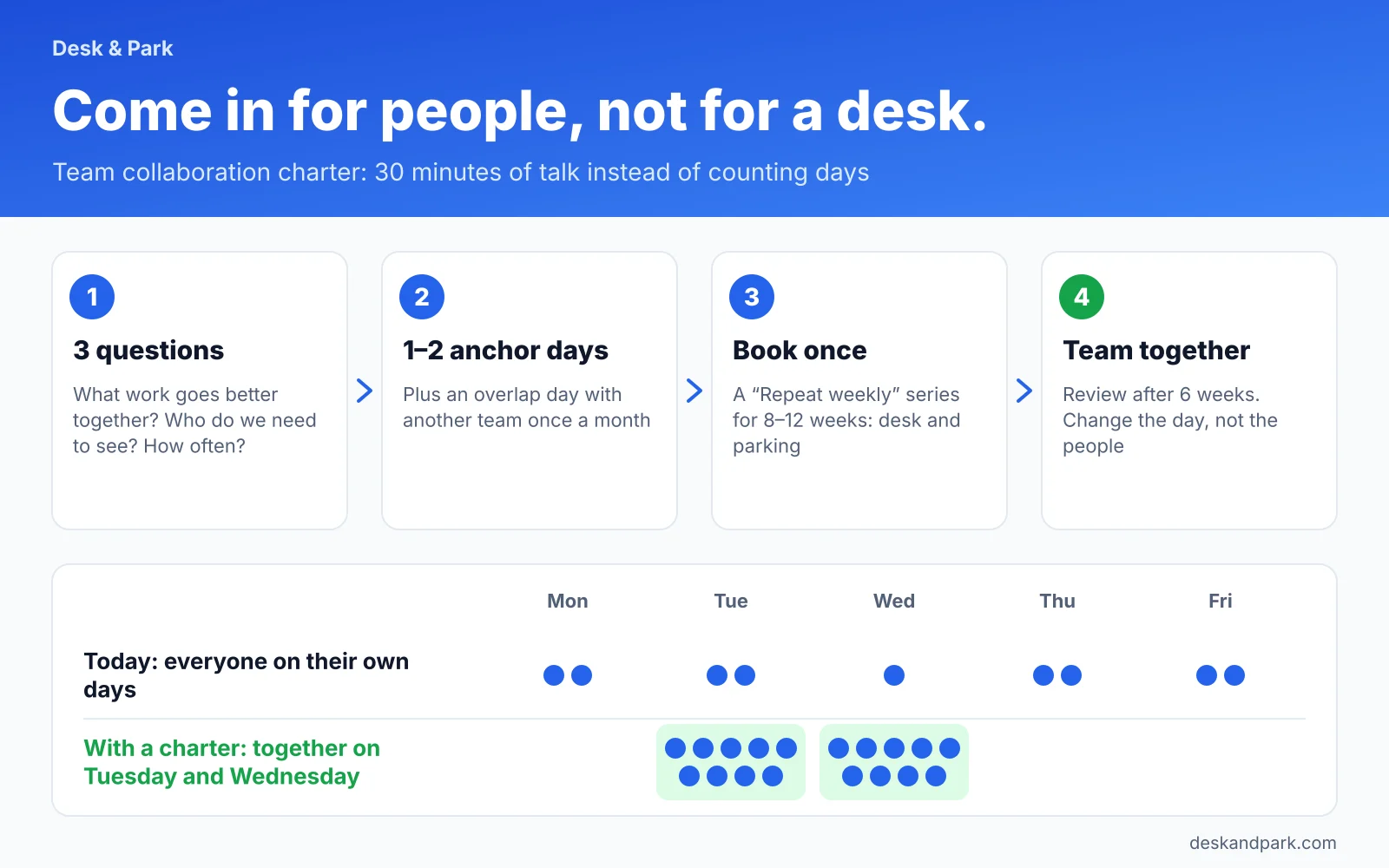
A team collaboration charter is a 30-minute conversation in which a team answers three questions: what work goes better together, who outside the team we need to see, and how often. The answers give you 1–2 anchor days a week and a cross-team overlap day with other teams, set for a quarter. Instead of tracking how many days people spend in the office, the team knows why it comes in, and books desks and parking once, as a series.
Two office days, and the whole team together once a month
Imagine Rachel, who leads a nine-person implementation team at a 180-person software company. The person and the company are made up for this example. The company's policy is "two days in the office a week," and on paper everyone follows it. But each person picks their own two days. Some come in on Monday because parking is easier, others on Friday because it is quiet. The whole team is in the office together about once a month, and only by chance.
The day count adds up, but the point is lost. People commute to sit on a video call with a colleague who stayed home, doing what they could have done from home. Rachel does not need another mandate. She needs the team to agree on the work where people need each other. That is what a collaboration charter is for.
Step 1: what work goes better together
Start with the work, not the calendar. Everyone writes down 3–5 kinds of work where having the others around actually helps. Then you combine the answers and keep the ones that come up most often.
Typical categories:
- Planning: a sprint, a quarter, priorities for the next few weeks.
- Onboarding new people: the first weeks of a new colleague, when questions come up every fifteen minutes.
- Client workshops: sessions around one whiteboard, in one room.
- Hard decisions: conversations where tone of voice matters, not just content.
Examples from different departments:
| Department | Work that goes better together |
|---|---|
| Implementation | weekly planning, onboarding new people, client workshops |
| Sales | pipeline review, preparing large proposals together, coaching after calls |
| Finance | month-end close, agreeing budgets with departments |
| IT | planning infrastructure changes, incident reviews |
Focused work does not go on this list. It can be done anywhere, and often best at home.
Step 2: who outside the team we need to see
The second question is about dependencies. Rachel's implementation team takes over clients from sales and hands back a finished implementation. When the two teams are in the office on different days, the client handover happens by email, and details get lost along the way.
List 1–3 teams you work with most, and note what exactly you do together with each. That is the material for a cross-team overlap day: one shared office day agreed with another team.
Step 3: how often
Now the frequency. For each kind of work from step 1 and each dependency from step 2, pick one of three answers: every week, every two weeks, or once a month.
| Frequency | What it means for bookings |
|---|---|
| Every week | an anchor day, booked as a series |
| Every two weeks | usually an anchor day too; in a week without shared work you stay home, and a single date in a series can be canceled |
| Once a month | an overlap day or a planning session, booked one date at a time |
For Rachel's team it came out like this: planning and onboarding every week, client workshops roughly every two weeks, handovers from sales once a month. Two anchor days and one overlap day a month.
Step 4: pick the days from data
You know how many days you need. Now pick which ones. Instead of voting, look at the data.
Board Reports include a heat map called Presence Across the Week. Departments are in rows, weekdays in columns, and each cell shows what share of the department is usually in the office on that day. It shows when the office is fullest, when it is calmer, and when the team you want an overlap day with tends to come in. Board members and administrators see Board Reports. On the Enterprise plan, a team lead can have the manager role and Team Reports narrowed to their own departments. Otherwise, ask your office manager for a look.
For Rachel's team, the heat map shows that Thursday is the busiest day for the whole office. Tuesday and Wednesday are calmer, and sales is mostly in on Tuesdays. The team picks Tuesday and Wednesday as anchor days and puts the overlap day with sales on the first Tuesday of the month. An overlap day on an anchor day adds no extra commute for anyone.
One note for the office manager. Department peaks do not add up to the office peak, because departments peak on different days. But if every team picks the same quiet day, it stops being quiet. That is why it pays to collect all team charters in one place before bookings start. How to size a department's needs from its P95 peak is covered in How many desks does a department really need?
Step 5: book once
What you agreed on paper has to become bookings, or it fades within two weeks. Book the anchor days once, as a series:
- Each person picks a desk on the map, ideally next to the rest of the team. The strip of faces of people coming in that day and the team color legend help with this.
- They check Repeat weekly and pick the anchor days, Tuesday and Wednesday for Rachel's team.
- They set the series to 8–12 weeks, roughly a quarter.
- Anyone who drives does the same for a parking space. Series work for desks and parking.
The series skips the location's holidays, so nobody holds a desk in an empty office on a day off. It also skips dates when the chosen desk is already taken, and says so plainly. The whole series is confirmed in one email with one calendar invitation. We cover the details in our article on recurring bookings and team anchor days.
Book the monthly overlap day one date at a time. Series in Desk & Park repeat weekly only; there is no "first Tuesday of the month" pattern. The simplest approach is to book three single dates for the quarter right away; with the default 90-day booking horizon, set for the whole organisation, they usually fit. If the overlap day falls on an anchor day, your team already has desks from its series, and only the visiting team books.
Step 6: review after 6 weeks
After six weeks, Rachel checks whether the charter works. She looks in two places.
- The "Who is in the office" panel for Tuesday and Wednesday. It shows photos of people with a booking, outlined in their team's color, a green dot after check-in, and a list grouped by team. Is the team actually together? More about the panel in Who is in the office today?
- The "Standing Bookings Nobody Attends" list in Board Reports. It shows series where the bookings stand but the people do not come. If the team's anchor days appear on this list, something is off.
When a day does not stick, the rule is: change the day, not the people. If half the team has standing client meetings outside the office on Wednesdays, Wednesday is a bad anchor day, not a sign of bad employees. Go back to step 4, pick another day, cancel the old series and book a new one.
A charter template to copy
| Field | What to fill in | Example (Rachel's team) |
|---|---|---|
| Team | team name | Implementation |
| Lead | name | Rachel |
| Work that needs presence | 3–5 kinds of work from step 1 | weekly planning, onboarding new people, client workshops |
| Teams we meet with | 1–3 teams and why | Sales: client handover |
| Frequency | every week, every two weeks, once a month | every week; overlap once a month |
| Anchor days | 1–2 weekdays | Tuesday and Wednesday |
| Overlap day | day and team | first Tuesday of the month, with sales |
| Review date | 6 weeks from the start | [date] |
Copy the table into your team's shared document. The charter fits on one page and has one review date, so nobody has to go looking for it.
Practical tips
- Start with two days, not five. One or two anchor days are easy to keep. You can always add a day at the review, while taking away days people have already planned around erodes trust.
- Account for people with a different rhythm. Someone works shifts, someone spends more time at clients than in the office. Write it into the charter: which anchor days they join and which they do not. "Mike is with us every other Tuesday" is better than pretending the rule covers everyone.
- Opting out of the map is fine. Anyone can turn off "Show me on the office map" in Settings → Profile. Their desk then becomes an anonymous pin, with no name in the server data either. The charter works through conversation, not through watching. That is the principle we describe in Horizontal transparency, vertical privacy.
- The team sets the charter, not HR. HR and the office manager collect the charters and make sure team days do not pile up on one day. The content of the charter belongs to the people who work together.
Scope: what Desk & Park does not do here
The collaboration charter is a method, and the product helps you carry it out. Desk & Park does not suggest office days: the heat map shows the pattern, and the team decides. It does not know your tasks, projects or meetings, so it cannot tell which work needs people in the room. It does not count how many days the team spent together in the office, and it has no team zones or colleague search. Series repeat weekly only. We keep the full list of what Desk & Park does not do yet in What Desk & Park doesn't do yet. And when it will.
You can try the heat map, the "Who is in the office" panel and recurring bookings on your own floor plan. Create your organization on the free Start plan.
FAQ
How many office days should a team have?
As many as the work you do together calls for. Most teams start well with 1–2 anchor days a week and one overlap day with another team a month. You check the number at the review after six weeks.
Can I book a once-a-month day as a series?
No. Series in Desk & Park repeat weekly only, on chosen weekdays, up to 90 days ahead. Book the monthly overlap day one date at a time, for example three dates for the quarter right away; with the organisation's default 90-day booking horizon they usually fit.
Will Desk & Park suggest which days to pick?
No. The "Presence Across the Week" heat map in Board Reports shows what share of each department is in the office on each weekday. The team uses it to pick its anchor days.
Who can see the "Presence Across the Week" heat map?
Board members and administrators see Board Reports. On the Enterprise plan, a manager can have Team Reports narrowed to their own departments and teams. Names in reports are off by default.
What if someone on the team does not want to be visible on the map?
They can turn off "Show me on the office map" in Settings → Profile. Their desk then appears as an anonymous pin, with no name in the server data either. The charter still works, because it relies on the team agreeing, not on watching.
#DeskAndPark#TeamCollaboration#HybridWork#AnchorDays#RecurringBookings
Ask AI about this article
Get a summary or a second opinion: each button opens the assistant with a question about this article.